Skip to content

绘图配置(runtime configuration)

导入模块
1
2
3
4
import matplotlib as mpl
import matplotlib.pyplot as plt
import seaborn as sns
import numpy as np

Matplotlib

matplotlibrc文件

Customizing Matplotlib with style sheets and rcParams — Matplotlib 3.10.1 documentation

matplotlib — Matplotlib 3.10.1 documentation

matplotlibrc

文件路径查看
1
2
3
4
mpl.matplotlib_fname()
"""
'D:\\SoftWare\\python\\python3_12_8\\Lib\\site-packages\\matplotlib\\mpl-data\\matplotlibrc'
"""

Matplotlib 使用 matplotlibrc 配置文件来自定义所有类型的属性,称为'rc 设置'或'rc 参数'。几乎可以控制 Matplotlib 中几乎每个属性的默认值:图形大小和 DPI、线宽、颜色和样式、坐标轴和网格属性、文本和字体属性等等。 matplotlibrc 在启动时读取以配置 Matplotlib。

matplotlib通过以下优先级顺序搜索对应目录下的matplotlibrc文件并读取,找到后不再搜索其它目录:

  1. 【!推荐】当前工作目录:仅用于当前工作目录下的配置

  2. 【!推荐】环境变量MATPLOTLIBRC指向的目录

  3. C:/Users/用户名/.config/matplotlib/目录

  4. python安装目录/Lib/site-packages/matplotlib/mpl-data/目录(如上):该目录下的matplotlibrc文件在每次更新或安装matplotlib时都会被覆盖。该处文件不建议修改。

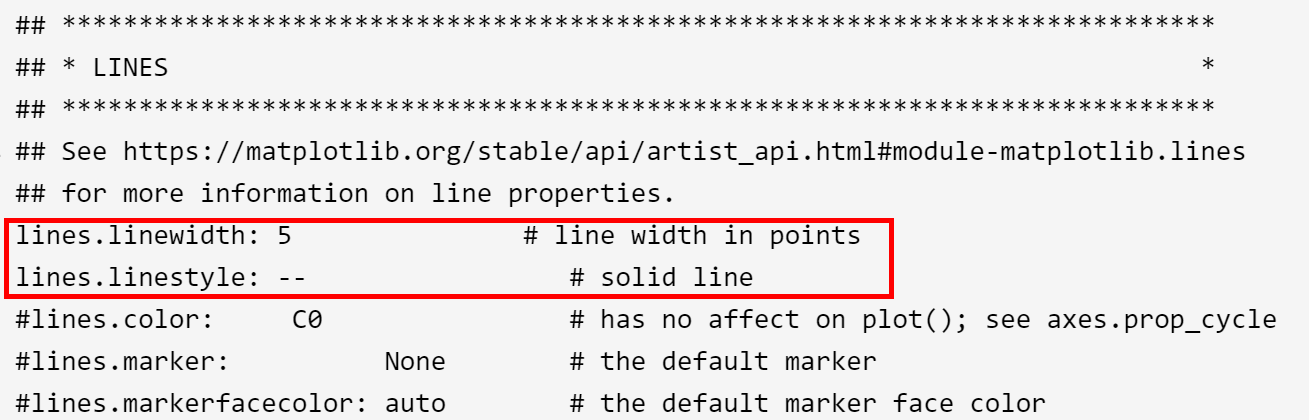
可以通过复制并修改该文件实现永久修改配置 (静态修改),以获得属于自己的配置文件。(修改时注意删除开头注释符号)

matplotlibrc
  1
  2
  3
  4
  5
  6
  7
  8
  9
 10
 11
 12
 13
 14
 15
 16
 17
 18
 19
 20
 21
 22
 23
 24
 25
 26
 27
 28
 29
 30
 31
 32
 33
 34
 35
 36
 37
 38
 39
 40
 41
 42
 43
 44
 45
 46
 47
 48
 49
 50
 51
 52
 53
 54
 55
 56
 57
 58
 59
 60
 61
 62
 63
 64
 65
 66
 67
 68
 69
 70
 71
 72
 73
 74
 75
 76
 77
 78
 79
 80
 81
 82
 83
 84
 85
 86
 87
 88
 89
 90
 91
 92
 93
 94
 95
 96
 97
 98
 99
100
101
102
103
104
105
106
107
108
109
110
111
112
113
114
115
116
117
118
119
120
121
122
123
124
125
126
127
128
129
130
131
132
133
134
135
136
137
138
139
140
141
142
143
144
145
146
147
148
149
150
151
152
153
154
155
156
157
158
159
160
161
162
163
164
165
166
167
168
169
170
171
172
173
174
175
176
177
178
179
180
181
182
183
184
185
186
187
188
189
190
191
192
193
194
195
196
197
198
199
200
201
202
203
204
205
206
207
208
209
210
211
212
213
214
215
216
217
218
219
220
221
222
223
224
225
226
227
228
229
230
231
232
233
234
235
236
237
238
239
240
241
242
243
244
245
246
247
248
249
250
251
252
253
254
255
256
257
258
259
260
261
262
263
264
265
266
267
268
269
270
271
272
273
274
275
276
277
278
279
280
281
282
283
284
285
286
287
288
289
290
291
292
293
294
295
296
297
298
299
300
301
302
303
304
305
306
307
308
309
310
311
312
313
314
315
316
317
318
319
320
321
322
323
324
325
326
327
328
329
330
331
332
333
334
335
336
337
338
339
340
341
342
343
344
345
346
347
348
349
350
351
352
353
354
355
356
357
358
359
360
361
362
363
364
365
366
367
368
369
370
371
372
373
374
375
376
377
378
379
380
381
382
383
384
385
386
387
388
389
390
391
392
393
394
395
396
397
398
399
400
401
402
403
404
405
406
407
408
409
410
411
412
413
414
415
416
417
418
419
420
421
422
423
424
425
426
427
428
429
430
431
432
433
434
435
436
437
438
439
440
441
442
443
444
445
446
447
448
449
450
451
452
453
454
455
456
457
458
459
460
461
462
463
464
465
466
467
468
469
470
471
472
473
474
475
476
477
478
479
480
481
482
483
484
485
486
487
488
489
490
491
492
493
494
495
496
497
498
499
500
501
502
503
504
505
506
507
508
509
510
511
512
513
514
515
516
517
518
519
520
521
522
523
524
525
526
527
528
529
530
531
532
533
534
535
536
537
538
539
540
541
542
543
544
545
546
547
548
549
550
551
552
553
554
555
556
557
558
559
560
561
562
563
564
565
566
567
568
569
570
571
572
573
574
575
576
577
578
579
580
581
582
583
584
585
586
587
588
589
590
591
592
593
594
595
596
597
598
599
600
601
602
603
604
605
606
607
608
609
610
611
612
613
614
615
616
617
618
619
620
621
622
623
624
625
626
627
628
629
630
631
632
633
634
635
636
637
638
639
640
641
642
643
644
645
646
647
648
649
650
651
652
653
654
655
656
657
658
659
660
661
662
663
664
665
666
667
668
669
670
671
672
673
674
675
676
677
678
679
680
681
682
683
684
685
686
687
688
689
690
691
692
693
694
695
696
697
698
699
700
701
702
703
704
705
706
707
708
709
710
711
712
713
714
715
716
717
718
719
720
721
722
723
724
725
726
727
728
729
730
731
732
733
734
735
736
737
738
739
740
741
742
743
744
745
746
747
748
749
750
751
752
753
754
755
756
757
758
759
760
761
762
763
764
765
766
767
768
769
770
771
772
773
774
775
776
777
778
779
780
781
782
783
784
785
786
787
788
789
790
791
792
793
794
795
796
797
798
799
800
801
802
803
804
805
806
807
808
809
810
811
812
813
#### MATPLOTLIBRC FORMAT

## NOTE FOR END USERS: DO NOT EDIT THIS FILE!
##
## This is a sample Matplotlib configuration file - you can find a copy
## of it on your system in site-packages/matplotlib/mpl-data/matplotlibrc
## (relative to your Python installation location).
## DO NOT EDIT IT!
##
## If you wish to change your default style, copy this file to one of the
## following locations:
##     Unix/Linux:
##         $HOME/.config/matplotlib/matplotlibrc OR
##         $XDG_CONFIG_HOME/matplotlib/matplotlibrc (if $XDG_CONFIG_HOME is set)
##     Other platforms:
##         $HOME/.matplotlib/matplotlibrc
## and edit that copy.
##
## See https://matplotlib.org/stable/users/explain/customizing.html#customizing-with-matplotlibrc-files
## for more details on the paths which are checked for the configuration file.
##
## Blank lines, or lines starting with a comment symbol, are ignored, as are
## trailing comments.  Other lines must have the format:
##     key: val  # optional comment
##
## Formatting: Use PEP8-like style (as enforced in the rest of the codebase).
## All lines start with an additional '#', so that removing all leading '#'s
## yields a valid style file.
##
## Colors: for the color values below, you can either use
##     - a Matplotlib color string, such as r, k, or b
##     - an RGB tuple, such as (1.0, 0.5, 0.0)
##     - a double-quoted hex string, such as "#ff00ff".
##       The unquoted string ff00ff is also supported for backward
##       compatibility, but is discouraged.
##     - a scalar grayscale intensity such as 0.75
##     - a legal html color name, e.g., red, blue, darkslategray
##
## String values may optionally be enclosed in double quotes, which allows
## using the comment character # in the string.
##
## This file (and other style files) must be encoded as utf-8.
##
## Matplotlib configuration are currently divided into following parts:
##     - BACKENDS
##     - LINES
##     - PATCHES
##     - HATCHES
##     - BOXPLOT
##     - FONT
##     - TEXT
##     - LaTeX
##     - AXES
##     - DATES
##     - TICKS
##     - GRIDS
##     - LEGEND
##     - FIGURE
##     - IMAGES
##     - CONTOUR PLOTS
##     - ERRORBAR PLOTS
##     - HISTOGRAM PLOTS
##     - SCATTER PLOTS
##     - AGG RENDERING
##     - PATHS
##     - SAVING FIGURES
##     - INTERACTIVE KEYMAPS
##     - ANIMATION

##### CONFIGURATION BEGINS HERE


## ***************************************************************************
## * BACKENDS                                                                *
## ***************************************************************************
## The default backend.  If you omit this parameter, the first working
## backend from the following list is used:
##     MacOSX QtAgg Gtk4Agg Gtk3Agg TkAgg WxAgg Agg
## Other choices include:
##     QtCairo GTK4Cairo GTK3Cairo TkCairo WxCairo Cairo
##     Qt5Agg Qt5Cairo Wx  # deprecated.
##     PS PDF SVG Template
## You can also deploy your own backend outside of Matplotlib by referring to
## the module name (which must be in the PYTHONPATH) as 'module://my_backend'.
##backend: Agg

## The port to use for the web server in the WebAgg backend.
#webagg.port: 8988

## The address on which the WebAgg web server should be reachable
#webagg.address: 127.0.0.1

## If webagg.port is unavailable, a number of other random ports will
## be tried until one that is available is found.
#webagg.port_retries: 50

## When True, open the web browser to the plot that is shown
#webagg.open_in_browser: True

## If you are running pyplot inside a GUI and your backend choice
## conflicts, we will automatically try to find a compatible one for
## you if backend_fallback is True
#backend_fallback: True

#interactive: False
#figure.hooks:          # list of dotted.module.name:dotted.callable.name
#toolbar:     toolbar2  # {None, toolbar2, toolmanager}
#timezone:    UTC       # a pytz timezone string, e.g., US/Central or Europe/Paris


## ***************************************************************************
## * LINES                                                                   *
## ***************************************************************************
## See https://matplotlib.org/stable/api/artist_api.html#module-matplotlib.lines
## for more information on line properties.
#lines.linewidth: 1.5               # line width in points
#lines.linestyle: -                 # solid line
#lines.color:     C0                # has no affect on plot(); see axes.prop_cycle
#lines.marker:          None        # the default marker
#lines.markerfacecolor: auto        # the default marker face color
#lines.markeredgecolor: auto        # the default marker edge color
#lines.markeredgewidth: 1.0         # the line width around the marker symbol
#lines.markersize:      6           # marker size, in points
#lines.dash_joinstyle:  round       # {miter, round, bevel}
#lines.dash_capstyle:   butt        # {butt, round, projecting}
#lines.solid_joinstyle: round       # {miter, round, bevel}
#lines.solid_capstyle:  projecting  # {butt, round, projecting}
#lines.antialiased: True            # render lines in antialiased (no jaggies)

## The three standard dash patterns.  These are scaled by the linewidth.
#lines.dashed_pattern: 3.7, 1.6
#lines.dashdot_pattern: 6.4, 1.6, 1, 1.6
#lines.dotted_pattern: 1, 1.65
#lines.scale_dashes: True

#markers.fillstyle: full  # {full, left, right, bottom, top, none}

#pcolor.shading: auto
#pcolormesh.snap: True  # Whether to snap the mesh to pixel boundaries. This is
                        # provided solely to allow old test images to remain
                        # unchanged. Set to False to obtain the previous behavior.

## ***************************************************************************
## * PATCHES                                                                 *
## ***************************************************************************
## Patches are graphical objects that fill 2D space, like polygons or circles.
## See https://matplotlib.org/stable/api/artist_api.html#module-matplotlib.patches
## for more information on patch properties.
#patch.linewidth:       1.0    # edge width in points.
#patch.facecolor:       C0
#patch.edgecolor:       black  # By default, Patches and Collections do not draw edges.
                               # This value is only used if facecolor is "none"
                               # (an Artist without facecolor and edgecolor would be
                               # invisible)  or if patch.force_edgecolor is True.
#patch.force_edgecolor: False  # By default, Patches and Collections do not draw edges.
                               # Set this to True to draw edges with patch.edgedcolor
                               # as the default edgecolor.
                               # This is mainly relevant for styles.
#patch.antialiased:     True   # render patches in antialiased (no jaggies)


## ***************************************************************************
## * HATCHES                                                                 *
## ***************************************************************************
#hatch.color:     black
#hatch.linewidth: 1.0


## ***************************************************************************
## * BOXPLOT                                                                 *
## ***************************************************************************
#boxplot.notch:       False
#boxplot.vertical:    True
#boxplot.whiskers:    1.5
#boxplot.bootstrap:   None
#boxplot.patchartist: False
#boxplot.showmeans:   False
#boxplot.showcaps:    True
#boxplot.showbox:     True
#boxplot.showfliers:  True
#boxplot.meanline:    False

#boxplot.flierprops.color:           black
#boxplot.flierprops.marker:          o
#boxplot.flierprops.markerfacecolor: none
#boxplot.flierprops.markeredgecolor: black
#boxplot.flierprops.markeredgewidth: 1.0
#boxplot.flierprops.markersize:      6
#boxplot.flierprops.linestyle:       none
#boxplot.flierprops.linewidth:       1.0

#boxplot.boxprops.color:     black
#boxplot.boxprops.linewidth: 1.0
#boxplot.boxprops.linestyle: -

#boxplot.whiskerprops.color:     black
#boxplot.whiskerprops.linewidth: 1.0
#boxplot.whiskerprops.linestyle: -

#boxplot.capprops.color:     black
#boxplot.capprops.linewidth: 1.0
#boxplot.capprops.linestyle: -

#boxplot.medianprops.color:     C1
#boxplot.medianprops.linewidth: 1.0
#boxplot.medianprops.linestyle: -

#boxplot.meanprops.color:           C2
#boxplot.meanprops.marker:          ^
#boxplot.meanprops.markerfacecolor: C2
#boxplot.meanprops.markeredgecolor: C2
#boxplot.meanprops.markersize:       6
#boxplot.meanprops.linestyle:       --
#boxplot.meanprops.linewidth:       1.0


## ***************************************************************************
## * FONT                                                                    *
## ***************************************************************************
## The font properties used by `text.Text`.
## See https://matplotlib.org/stable/api/font_manager_api.html for more information
## on font properties.  The 6 font properties used for font matching are
## given below with their default values.
##
## The font.family property can take either a single or multiple entries of any
## combination of concrete font names (not supported when rendering text with
## usetex) or the following five generic values:
##     - 'serif' (e.g., Times),
##     - 'sans-serif' (e.g., Helvetica),
##     - 'cursive' (e.g., Zapf-Chancery),
##     - 'fantasy' (e.g., Western), and
##     - 'monospace' (e.g., Courier).
## Each of these values has a corresponding default list of font names
## (font.serif, etc.); the first available font in the list is used.  Note that
## for font.serif, font.sans-serif, and font.monospace, the first element of
## the list (a DejaVu font) will always be used because DejaVu is shipped with
## Matplotlib and is thus guaranteed to be available; the other entries are
## left as examples of other possible values.
##
## The font.style property has three values: normal (or roman), italic
## or oblique.  The oblique style will be used for italic, if it is not
## present.
##
## The font.variant property has two values: normal or small-caps.  For
## TrueType fonts, which are scalable fonts, small-caps is equivalent
## to using a font size of 'smaller', or about 83 % of the current font
## size.
##
## The font.weight property has effectively 13 values: normal, bold,
## bolder, lighter, 100, 200, 300, ..., 900.  Normal is the same as
## 400, and bold is 700.  bolder and lighter are relative values with
## respect to the current weight.
##
## The font.stretch property has 11 values: ultra-condensed,
## extra-condensed, condensed, semi-condensed, normal, semi-expanded,
## expanded, extra-expanded, ultra-expanded, wider, and narrower.  This
## property is not currently implemented.
##
## The font.size property is the default font size for text, given in points.
## 10 pt is the standard value.
##
## Note that font.size controls default text sizes.  To configure
## special text sizes tick labels, axes, labels, title, etc., see the rc
## settings for axes and ticks.  Special text sizes can be defined
## relative to font.size, using the following values: xx-small, x-small,
## small, medium, large, x-large, xx-large, larger, or smaller

#font.family:  sans-serif
#font.style:   normal
#font.variant: normal
#font.weight:  normal
#font.stretch: normal
#font.size:    10.0

#font.serif:      DejaVu Serif, Bitstream Vera Serif, Computer Modern Roman, New Century Schoolbook, Century Schoolbook L, Utopia, ITC Bookman, Bookman, Nimbus Roman No9 L, Times New Roman, Times, Palatino, Charter, serif
#font.sans-serif: DejaVu Sans, Bitstream Vera Sans, Computer Modern Sans Serif, Lucida Grande, Verdana, Geneva, Lucid, Arial, Helvetica, Avant Garde, sans-serif
#font.cursive:    Apple Chancery, Textile, Zapf Chancery, Sand, Script MT, Felipa, Comic Neue, Comic Sans MS, cursive
#font.fantasy:    Chicago, Charcoal, Impact, Western, xkcd script, fantasy
#font.monospace:  DejaVu Sans Mono, Bitstream Vera Sans Mono, Computer Modern Typewriter, Andale Mono, Nimbus Mono L, Courier New, Courier, Fixed, Terminal, monospace


## ***************************************************************************
## * TEXT                                                                    *
## ***************************************************************************
## The text properties used by `text.Text`.
## See https://matplotlib.org/stable/api/artist_api.html#module-matplotlib.text
## for more information on text properties
#text.color: black

## FreeType hinting flag ("foo" corresponds to FT_LOAD_FOO); may be one of the
## following (Proprietary Matplotlib-specific synonyms are given in parentheses,
## but their use is discouraged):
## - default: Use the font's native hinter if possible, else FreeType's auto-hinter.
##            ("either" is a synonym).
## - no_autohint: Use the font's native hinter if possible, else don't hint.
##                ("native" is a synonym.)
## - force_autohint: Use FreeType's auto-hinter.  ("auto" is a synonym.)
## - no_hinting: Disable hinting.  ("none" is a synonym.)
#text.hinting: force_autohint

#text.hinting_factor: 8  # Specifies the amount of softness for hinting in the
                         # horizontal direction.  A value of 1 will hint to full
                         # pixels.  A value of 2 will hint to half pixels etc.
#text.kerning_factor: 0  # Specifies the scaling factor for kerning values.  This
                         # is provided solely to allow old test images to remain
                         # unchanged.  Set to 6 to obtain previous behavior.
                         # Values  other than 0 or 6 have no defined meaning.
#text.antialiased: True  # If True (default), the text will be antialiased.
                         # This only affects raster outputs.
#text.parse_math: True  # Use mathtext if there is an even number of unescaped
                        # dollar signs.


## ***************************************************************************
## * LaTeX                                                                   *
## ***************************************************************************
## For more information on LaTeX properties, see
## https://matplotlib.org/stable/users/explain/text/usetex.html
#text.usetex: False  # use latex for all text handling. The following fonts
                     # are supported through the usual rc parameter settings:
                     # new century schoolbook, bookman, times, palatino,
                     # zapf chancery, charter, serif, sans-serif, helvetica,
                     # avant garde, courier, monospace, computer modern roman,
                     # computer modern sans serif, computer modern typewriter
#text.latex.preamble:   # IMPROPER USE OF THIS FEATURE WILL LEAD TO LATEX FAILURES
                        # AND IS THEREFORE UNSUPPORTED. PLEASE DO NOT ASK FOR HELP
                        # IF THIS FEATURE DOES NOT DO WHAT YOU EXPECT IT TO.
                        # text.latex.preamble is a single line of LaTeX code that
                        # will be passed on to the LaTeX system. It may contain
                        # any code that is valid for the LaTeX "preamble", i.e.
                        # between the "\documentclass" and "\begin{document}"
                        # statements.
                        # Note that it has to be put on a single line, which may
                        # become quite long.
                        # The following packages are always loaded with usetex,
                        # so beware of package collisions:
                        #   geometry, inputenc, type1cm.
                        # PostScript (PSNFSS) font packages may also be
                        # loaded, depending on your font settings.

## The following settings allow you to select the fonts in math mode.
#mathtext.fontset: dejavusans  # Should be 'dejavusans' (default),
                               # 'dejavuserif', 'cm' (Computer Modern), 'stix',
                               # 'stixsans' or 'custom'
## "mathtext.fontset: custom" is defined by the mathtext.bf, .cal, .it, ...
## settings which map a TeX font name to a fontconfig font pattern.  (These
## settings are not used for other font sets.)
#mathtext.bf:  sans:bold
#mathtext.bfit: sans:italic:bold
#mathtext.cal: cursive
#mathtext.it:  sans:italic
#mathtext.rm:  sans
#mathtext.sf:  sans
#mathtext.tt:  monospace
#mathtext.fallback: cm  # Select fallback font from ['cm' (Computer Modern), 'stix'
                        # 'stixsans'] when a symbol cannot be found in one of the
                        # custom math fonts. Select 'None' to not perform fallback
                        # and replace the missing character by a dummy symbol.
#mathtext.default: it  # The default font to use for math.
                       # Can be any of the LaTeX font names, including
                       # the special name "regular" for the same font
                       # used in regular text.


## ***************************************************************************
## * AXES                                                                    *
## ***************************************************************************
## Following are default face and edge colors, default tick sizes,
## default font sizes for tick labels, and so on.  See
## https://matplotlib.org/stable/api/axes_api.html#module-matplotlib.axes
#axes.facecolor:     white   # axes background color
#axes.edgecolor:     black   # axes edge color
#axes.linewidth:     0.8     # edge line width
#axes.grid:          False   # display grid or not
#axes.grid.axis:     both    # which axis the grid should apply to
#axes.grid.which:    major   # grid lines at {major, minor, both} ticks
#axes.titlelocation: center  # alignment of the title: {left, right, center}
#axes.titlesize:     large   # font size of the axes title
#axes.titleweight:   normal  # font weight of title
#axes.titlecolor:    auto    # color of the axes title, auto falls back to
                             # text.color as default value
#axes.titley:        None    # position title (axes relative units).  None implies auto
#axes.titlepad:      6.0     # pad between axes and title in points
#axes.labelsize:     medium  # font size of the x and y labels
#axes.labelpad:      4.0     # space between label and axis
#axes.labelweight:   normal  # weight of the x and y labels
#axes.labelcolor:    black
#axes.axisbelow:     line    # draw axis gridlines and ticks:
                             #     - below patches (True)
                             #     - above patches but below lines ('line')
                             #     - above all (False)

#axes.formatter.limits: -5, 6  # use scientific notation if log10
                               # of the axis range is smaller than the
                               # first or larger than the second
#axes.formatter.use_locale: False  # When True, format tick labels
                                   # according to the user's locale.
                                   # For example, use ',' as a decimal
                                   # separator in the fr_FR locale.
#axes.formatter.use_mathtext: False  # When True, use mathtext for scientific
                                     # notation.
#axes.formatter.min_exponent: 0  # minimum exponent to format in scientific notation
#axes.formatter.useoffset: True  # If True, the tick label formatter
                                 # will default to labeling ticks relative
                                 # to an offset when the data range is
                                 # small compared to the minimum absolute
                                 # value of the data.
#axes.formatter.offset_threshold: 4  # When useoffset is True, the offset
                                     # will be used when it can remove
                                     # at least this number of significant
                                     # digits from tick labels.

#axes.spines.left:   True  # display axis spines
#axes.spines.bottom: True
#axes.spines.top:    True
#axes.spines.right:  True

#axes.unicode_minus: True  # use Unicode for the minus symbol rather than hyphen.  See
                           # https://en.wikipedia.org/wiki/Plus_and_minus_signs#Character_codes
#axes.prop_cycle: cycler('color', ['1f77b4', 'ff7f0e', '2ca02c', 'd62728', '9467bd', '8c564b', 'e377c2', '7f7f7f', 'bcbd22', '17becf'])
                  # color cycle for plot lines as list of string color specs:
                  # single letter, long name, or web-style hex
                  # As opposed to all other parameters in this file, the color
                  # values must be enclosed in quotes for this parameter,
                  # e.g. '1f77b4', instead of 1f77b4.
                  # See also https://matplotlib.org/stable/users/explain/artists/color_cycle.html
                  # for more details on prop_cycle usage.
#axes.xmargin:   .05  # x margin.  See `axes.Axes.margins`
#axes.ymargin:   .05  # y margin.  See `axes.Axes.margins`
#axes.zmargin:   .05  # z margin.  See `axes.Axes.margins`
#axes.autolimit_mode: data  # If "data", use axes.xmargin and axes.ymargin as is.
                            # If "round_numbers", after application of margins, axis
                            # limits are further expanded to the nearest "round" number.
#polaraxes.grid:    True   # display grid on polar axes
#axes3d.grid:       True   # display grid on 3D axes
#axes3d.automargin: False  # automatically add margin when manually setting 3D axis limits

#axes3d.xaxis.panecolor:    (0.95, 0.95, 0.95, 0.5)  # background pane on 3D axes
#axes3d.yaxis.panecolor:    (0.90, 0.90, 0.90, 0.5)  # background pane on 3D axes
#axes3d.zaxis.panecolor:    (0.925, 0.925, 0.925, 0.5)  # background pane on 3D axes

#axes3d.mouserotationstyle: arcball  # {azel, trackball, sphere, arcball}
                            # See also https://matplotlib.org/stable/api/toolkits/mplot3d/view_angles.html#rotation-with-mouse
#axes3d.trackballsize: 0.667  # trackball diameter, in units of the Axes bbox
#axes3d.trackballborder: 0.2  # trackball border width, in units of the Axes bbox (only for 'sphere' and 'arcball' style)

## ***************************************************************************
## * AXIS                                                                    *
## ***************************************************************************
#xaxis.labellocation: center  # alignment of the xaxis label: {left, right, center}
#yaxis.labellocation: center  # alignment of the yaxis label: {bottom, top, center}


## ***************************************************************************
## * DATES                                                                   *
## ***************************************************************************
## These control the default format strings used in AutoDateFormatter.
## Any valid format datetime format string can be used (see the python
## `datetime` for details).  For example, by using:
##     - '%x' will use the locale date representation
##     - '%X' will use the locale time representation
##     - '%c' will use the full locale datetime representation
## These values map to the scales:
##     {'year': 365, 'month': 30, 'day': 1, 'hour': 1/24, 'minute': 1 / (24 * 60)}

#date.autoformatter.year:        %Y
#date.autoformatter.month:       %Y-%m
#date.autoformatter.day:         %Y-%m-%d
#date.autoformatter.hour:        %m-%d %H
#date.autoformatter.minute:      %d %H:%M
#date.autoformatter.second:      %H:%M:%S
#date.autoformatter.microsecond: %M:%S.%f
## The reference date for Matplotlib's internal date representation
## See https://matplotlib.org/stable/gallery/ticks/date_precision_and_epochs.html
#date.epoch: 1970-01-01T00:00:00
## 'auto', 'concise':
#date.converter:                  auto
## For auto converter whether to use interval_multiples:
#date.interval_multiples:         True

## ***************************************************************************
## * TICKS                                                                   *
## ***************************************************************************
## See https://matplotlib.org/stable/api/axis_api.html#matplotlib.axis.Tick
#xtick.top:           False   # draw ticks on the top side
#xtick.bottom:        True    # draw ticks on the bottom side
#xtick.labeltop:      False   # draw label on the top
#xtick.labelbottom:   True    # draw label on the bottom
#xtick.major.size:    3.5     # major tick size in points
#xtick.minor.size:    2       # minor tick size in points
#xtick.major.width:   0.8     # major tick width in points
#xtick.minor.width:   0.6     # minor tick width in points
#xtick.major.pad:     3.5     # distance to major tick label in points
#xtick.minor.pad:     3.4     # distance to the minor tick label in points
#xtick.color:         black   # color of the ticks
#xtick.labelcolor:    inherit # color of the tick labels or inherit from xtick.color
#xtick.labelsize:     medium  # font size of the tick labels
#xtick.direction:     out     # direction: {in, out, inout}
#xtick.minor.visible: False   # visibility of minor ticks on x-axis
#xtick.major.top:     True    # draw x axis top major ticks
#xtick.major.bottom:  True    # draw x axis bottom major ticks
#xtick.minor.top:     True    # draw x axis top minor ticks
#xtick.minor.bottom:  True    # draw x axis bottom minor ticks
#xtick.minor.ndivs:   auto    # number of minor ticks between the major ticks on x-axis
#xtick.alignment:     center  # alignment of xticks

#ytick.left:          True    # draw ticks on the left side
#ytick.right:         False   # draw ticks on the right side
#ytick.labelleft:     True    # draw tick labels on the left side
#ytick.labelright:    False   # draw tick labels on the right side
#ytick.major.size:    3.5     # major tick size in points
#ytick.minor.size:    2       # minor tick size in points
#ytick.major.width:   0.8     # major tick width in points
#ytick.minor.width:   0.6     # minor tick width in points
#ytick.major.pad:     3.5     # distance to major tick label in points
#ytick.minor.pad:     3.4     # distance to the minor tick label in points
#ytick.color:         black   # color of the ticks
#ytick.labelcolor:    inherit # color of the tick labels or inherit from ytick.color
#ytick.labelsize:     medium  # font size of the tick labels
#ytick.direction:     out     # direction: {in, out, inout}
#ytick.minor.visible: False   # visibility of minor ticks on y-axis
#ytick.major.left:    True    # draw y axis left major ticks
#ytick.major.right:   True    # draw y axis right major ticks
#ytick.minor.left:    True    # draw y axis left minor ticks
#ytick.minor.right:   True    # draw y axis right minor ticks
#ytick.minor.ndivs:   auto    # number of minor ticks between the major ticks on y-axis
#ytick.alignment:     center_baseline  # alignment of yticks


## ***************************************************************************
## * GRIDS                                                                   *
## ***************************************************************************
#grid.color:     "#b0b0b0"  # grid color
#grid.linestyle: -          # solid
#grid.linewidth: 0.8        # in points
#grid.alpha:     1.0        # transparency, between 0.0 and 1.0


## ***************************************************************************
## * LEGEND                                                                  *
## ***************************************************************************
#legend.loc:           best
#legend.frameon:       True     # if True, draw the legend on a background patch
#legend.framealpha:    0.8      # legend patch transparency
#legend.facecolor:     inherit  # inherit from axes.facecolor; or color spec
#legend.edgecolor:     0.8      # background patch boundary color
#legend.fancybox:      True     # if True, use a rounded box for the
                                # legend background, else a rectangle
#legend.shadow:        False    # if True, give background a shadow effect
#legend.numpoints:     1        # the number of marker points in the legend line
#legend.scatterpoints: 1        # number of scatter points
#legend.markerscale:   1.0      # the relative size of legend markers vs. original
#legend.fontsize:      medium
#legend.labelcolor:    None
#legend.title_fontsize: None    # None sets to the same as the default axes.

## Dimensions as fraction of font size:
#legend.borderpad:     0.4  # border whitespace
#legend.labelspacing:  0.5  # the vertical space between the legend entries
#legend.handlelength:  2.0  # the length of the legend lines
#legend.handleheight:  0.7  # the height of the legend handle
#legend.handletextpad: 0.8  # the space between the legend line and legend text
#legend.borderaxespad: 0.5  # the border between the axes and legend edge
#legend.columnspacing: 2.0  # column separation


## ***************************************************************************
## * FIGURE                                                                  *
## ***************************************************************************
## See https://matplotlib.org/stable/api/figure_api.html#matplotlib.figure.Figure
#figure.titlesize:   large     # size of the figure title (``Figure.suptitle()``)
#figure.titleweight: normal    # weight of the figure title
#figure.labelsize:   large     # size of the figure label (``Figure.sup[x|y]label()``)
#figure.labelweight: normal    # weight of the figure label
#figure.figsize:     6.4, 4.8  # figure size in inches
#figure.dpi:         100       # figure dots per inch
#figure.facecolor:   white     # figure face color
#figure.edgecolor:   white     # figure edge color
#figure.frameon:     True      # enable figure frame
#figure.max_open_warning: 20   # The maximum number of figures to open through
                               # the pyplot interface before emitting a warning.
                               # If less than one this feature is disabled.
#figure.raise_window : True    # Raise the GUI window to front when show() is called.

## The figure subplot parameters.  All dimensions are a fraction of the figure width and height.
#figure.subplot.left:   0.125  # the left side of the subplots of the figure
#figure.subplot.right:  0.9    # the right side of the subplots of the figure
#figure.subplot.bottom: 0.11   # the bottom of the subplots of the figure
#figure.subplot.top:    0.88   # the top of the subplots of the figure
#figure.subplot.wspace: 0.2    # the amount of width reserved for space between subplots,
                               # expressed as a fraction of the average axis width
#figure.subplot.hspace: 0.2    # the amount of height reserved for space between subplots,
                               # expressed as a fraction of the average axis height

## Figure layout
#figure.autolayout: False  # When True, automatically adjust subplot
                           # parameters to make the plot fit the figure
                           # using `tight_layout`
#figure.constrained_layout.use: False  # When True, automatically make plot
                                       # elements fit on the figure. (Not
                                       # compatible with `autolayout`, above).
## Padding (in inches) around axes; defaults to 3/72 inches, i.e. 3 points.
#figure.constrained_layout.h_pad:  0.04167
#figure.constrained_layout.w_pad:  0.04167
## Spacing between subplots, relative to the subplot sizes.  Much smaller than for
## tight_layout (figure.subplot.hspace, figure.subplot.wspace) as constrained_layout
## already takes surrounding texts (titles, labels, # ticklabels) into account.
#figure.constrained_layout.hspace: 0.02
#figure.constrained_layout.wspace: 0.02


## ***************************************************************************
## * IMAGES                                                                  *
## ***************************************************************************
#image.aspect:          equal        # {equal, auto} or a number
#image.interpolation:   auto         # see help(imshow) for options
#image.interpolation_stage: auto     # see help(imshow) for options
#image.cmap:            viridis      # A colormap name (plasma, magma, etc.)
#image.lut:             256          # the size of the colormap lookup table
#image.origin:          upper        # {lower, upper}
#image.resample:        True
#image.composite_image: True  # When True, all the images on a set of axes are
                              # combined into a single composite image before
                              # saving a figure as a vector graphics file,
                              # such as a PDF.


## ***************************************************************************
## * CONTOUR PLOTS                                                           *
## ***************************************************************************
#contour.negative_linestyle: dashed  # string or on-off ink sequence
#contour.corner_mask:        True    # {True, False}
#contour.linewidth:          None    # {float, None} Size of the contour line
                                     # widths. If set to None, it falls back to
                                     # `line.linewidth`.
#contour.algorithm:          mpl2014 # {mpl2005, mpl2014, serial, threaded}


## ***************************************************************************
## * ERRORBAR PLOTS                                                          *
## ***************************************************************************
#errorbar.capsize: 0  # length of end cap on error bars in pixels


## ***************************************************************************
## * HISTOGRAM PLOTS                                                         *
## ***************************************************************************
#hist.bins: 10  # The default number of histogram bins or 'auto'.


## ***************************************************************************
## * SCATTER PLOTS                                                           *
## ***************************************************************************
#scatter.marker: o         # The default marker type for scatter plots.
#scatter.edgecolors: face  # The default edge colors for scatter plots.


## ***************************************************************************
## * AGG RENDERING                                                           *
## ***************************************************************************
## Warning: experimental, 2008/10/10
#agg.path.chunksize: 0  # 0 to disable; values in the range
                        # 10000 to 100000 can improve speed slightly
                        # and prevent an Agg rendering failure
                        # when plotting very large data sets,
                        # especially if they are very gappy.
                        # It may cause minor artifacts, though.
                        # A value of 20000 is probably a good
                        # starting point.


## ***************************************************************************
## * PATHS                                                                   *
## ***************************************************************************
#path.simplify: True  # When True, simplify paths by removing "invisible"
                      # points to reduce file size and increase rendering
                      # speed
#path.simplify_threshold: 0.111111111111  # The threshold of similarity below
                                          # which vertices will be removed in
                                          # the simplification process.
#path.snap: True  # When True, rectilinear axis-aligned paths will be snapped
                  # to the nearest pixel when certain criteria are met.
                  # When False, paths will never be snapped.
#path.sketch: None  # May be None, or a tuple of the form:
                    #  path.sketch: (scale, length, randomness)
                    # - *scale* is the amplitude of the wiggle
                    #    perpendicular to the line (in pixels).
                    # - *length* is the length of the wiggle along the
                    #    line (in pixels).
                    # - *randomness* is the factor by which the length is
                    #    randomly scaled.
#path.effects:


## ***************************************************************************
## * SAVING FIGURES                                                          *
## ***************************************************************************
## The default savefig parameters can be different from the display parameters
## e.g., you may want a higher resolution, or to make the figure
## background white
#savefig.dpi:       figure      # figure dots per inch or 'figure'
#savefig.facecolor: auto        # figure face color when saving
#savefig.edgecolor: auto        # figure edge color when saving
#savefig.format:    png         # {png, ps, pdf, svg}
#savefig.bbox:      standard    # {tight, standard}
                                # 'tight' is incompatible with generating frames
                                # for animation
#savefig.pad_inches:  0.1       # padding to be used, when bbox is set to 'tight'
#savefig.directory:   ~         # default directory in savefig dialog, gets updated after
                                # interactive saves, unless set to the empty string (i.e.
                                # the current directory); use '.' to start at the current
                                # directory but update after interactive saves
#savefig.transparent: False     # whether figures are saved with a transparent
                                # background by default
#savefig.orientation: portrait  # orientation of saved figure, for PostScript output only

### macosx backend params
#macosx.window_mode : system   # How to open new figures (system, tab, window)
                               # system uses the MacOS system preferences

### tk backend params
#tk.window_focus:   False  # Maintain shell focus for TkAgg

### ps backend params
#ps.papersize:      letter  # {figure, letter, legal, ledger, A0-A10, B0-B10}
#ps.useafm:         False   # use AFM fonts, results in small files
#ps.usedistiller:   False   # {ghostscript, xpdf, None}
                            # Experimental: may produce smaller files.
                            # xpdf intended for production of publication quality files,
                            # but requires ghostscript, xpdf and ps2eps
#ps.distiller.res:  6000    # dpi
#ps.fonttype:       3       # Output Type 3 (Type3) or Type 42 (TrueType)

### PDF backend params
#pdf.compression:    6  # integer from 0 to 9
                        # 0 disables compression (good for debugging)
#pdf.fonttype:       3  # Output Type 3 (Type3) or Type 42 (TrueType)
#pdf.use14corefonts: False
#pdf.inheritcolor:   False

### SVG backend params
#svg.image_inline: True  # Write raster image data directly into the SVG file
#svg.fonttype: path      # How to handle SVG fonts:
                         #     path: Embed characters as paths -- supported
                         #           by most SVG renderers
                         #     None: Assume fonts are installed on the
                         #           machine where the SVG will be viewed.
#svg.hashsalt: None      # If not None, use this string as hash salt instead of uuid4
#svg.id: None            # If not None, use this string as the value for the `id`
                         # attribute in the top <svg> tag

### pgf parameter
## See https://matplotlib.org/stable/tutorials/text/pgf.html for more information.
#pgf.rcfonts: True
#pgf.preamble:  # See text.latex.preamble for documentation
#pgf.texsystem: xelatex

### docstring params
#docstring.hardcopy: False  # set this when you want to generate hardcopy docstring


## ***************************************************************************
## * INTERACTIVE KEYMAPS                                                     *
## ***************************************************************************
## Event keys to interact with figures/plots via keyboard.
## See https://matplotlib.org/stable/users/explain/interactive.html for more
## details on interactive navigation.  Customize these settings according to
## your needs. Leave the field(s) empty if you don't need a key-map. (i.e.,
## fullscreen : '')
#keymap.fullscreen: f, ctrl+f   # toggling
#keymap.home: h, r, home        # home or reset mnemonic
#keymap.back: left, c, backspace, MouseButton.BACK  # forward / backward keys
#keymap.forward: right, v, MouseButton.FORWARD      # for quick navigation
#keymap.pan: p                  # pan mnemonic
#keymap.zoom: o                 # zoom mnemonic
#keymap.save: s, ctrl+s         # saving current figure
#keymap.help: f1                # display help about active tools
#keymap.quit: ctrl+w, cmd+w, q  # close the current figure
#keymap.quit_all:               # close all figures
#keymap.grid: g                 # switching on/off major grids in current axes
#keymap.grid_minor: G           # switching on/off minor grids in current axes
#keymap.yscale: l               # toggle scaling of y-axes ('log'/'linear')
#keymap.xscale: k, L            # toggle scaling of x-axes ('log'/'linear')
#keymap.copy: ctrl+c, cmd+c     # copy figure to clipboard


## ***************************************************************************
## * ANIMATION                                                               *
## ***************************************************************************
#animation.html: none  # How to display the animation as HTML in
                       # the IPython notebook:
                       #     - 'html5' uses HTML5 video tag
                       #     - 'jshtml' creates a JavaScript animation
#animation.writer:  ffmpeg        # MovieWriter 'backend' to use
#animation.codec:   h264          # Codec to use for writing movie
#animation.bitrate: -1            # Controls size/quality trade-off for movie.
                                  # -1 implies let utility auto-determine
#animation.frame_format: png      # Controls frame format used by temp files

## Path to ffmpeg binary.  Unqualified paths are resolved by subprocess.Popen.
#animation.ffmpeg_path:  ffmpeg
## Additional arguments to pass to ffmpeg.
#animation.ffmpeg_args:

## Path to ImageMagick's convert binary.  Unqualified paths are resolved by
## subprocess.Popen, except that on Windows, we look up an install of
## ImageMagick in the registry (as convert is also the name of a system tool).
#animation.convert_path: convert
## Additional arguments to pass to convert.
#animation.convert_args: -layers, OptimizePlus
#
#animation.embed_limit:  20.0     # Limit, in MB, of size of base64 encoded
                                  # animation in HTML (i.e. IPython notebook)

img.png

1
2
3
4
5
6
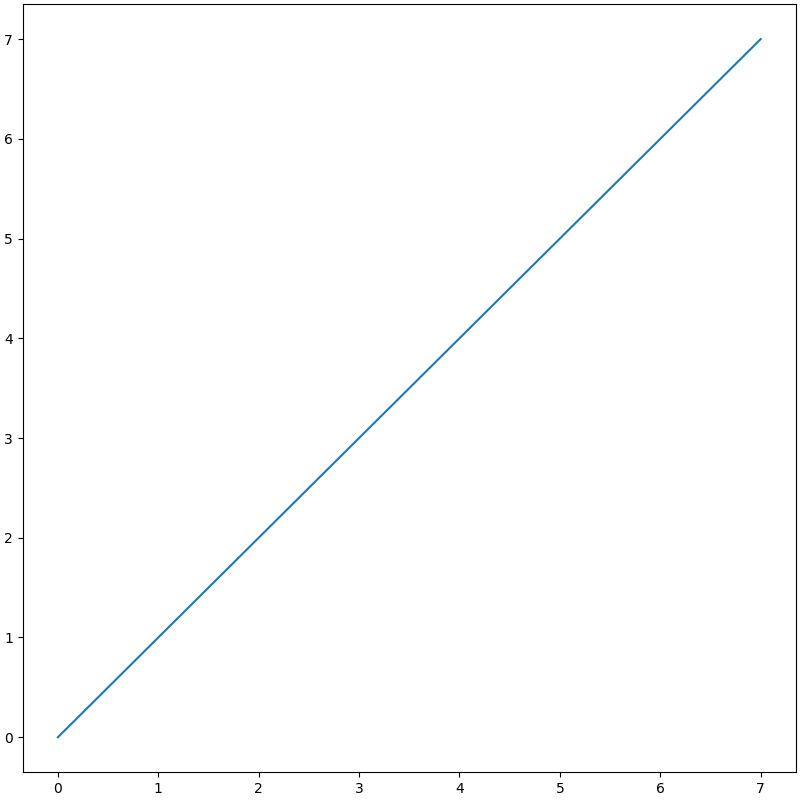
fig = plt.figure(figsize=(8, 8), dpi=100, layout="constrained")
ax = fig.add_subplot(1, 1, 1)

ax.plot(range(0, 8))

plt.show()

img.png

img.png

rc设置

Customizing Matplotlib with style sheets and rcParams — Matplotlib 3.10.1 documentation

rcParams字典

matplotlib — Matplotlib 3.8.0 documentation

matplotlib — Matplotlib 3.10.1 documentation

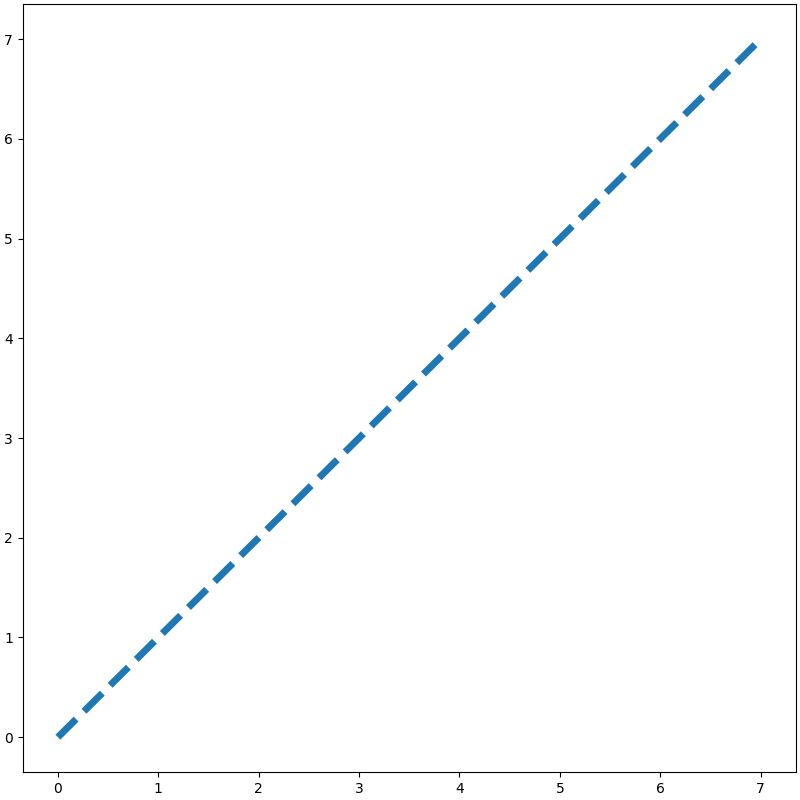
mpl.rcParams将从matplotlibrc文件读取的的元素属性储存在一个字典中,通过对字典键值对的修改,实现在当前代码项目中修改全局配置(动态修改),不会对matplotlibrc文件产生修改。

rcParams字典
mpl.rcParams
"""
RcParams({'_internal.classic_mode': False,
          'agg.path.chunksize': 0,
          'animation.bitrate': -1,
          'animation.codec': 'h264',
          'animation.convert_args': ['-layers', 'OptimizePlus'],
          'animation.convert_path': 'convert',
          'animation.embed_limit': 20.0,
          'animation.ffmpeg_args': [],
          'animation.ffmpeg_path': 'ffmpeg',
          'animation.frame_format': 'png',
          'animation.html': 'none',
          'animation.writer': 'ffmpeg',
          'axes.autolimit_mode': 'data',
          'axes.axisbelow': 'line',
          'axes.edgecolor': 'black',
          'axes.facecolor': 'white',
          'axes.formatter.limits': [-5, 6],
          'axes.formatter.min_exponent': 0,
          'axes.formatter.offset_threshold': 4,
          'axes.formatter.use_locale': False,
          'axes.formatter.use_mathtext': False,
          'axes.formatter.useoffset': True,
          'axes.grid': False,
          'axes.grid.axis': 'both',
          'axes.grid.which': 'major',
          'axes.labelcolor': 'black',
          'axes.labelpad': 4.0,
          'axes.labelsize': 'medium',
          'axes.labelweight': 'normal',
          'axes.linewidth': 0.8,
          'axes.prop_cycle': cycler('color', ['#1f77b4', '#ff7f0e', '#2ca02c', '#d62728', '#9467bd', '#8c564b', '#e377c2', '#7f7f7f', '#bcbd22', '#17becf']),
          'axes.spines.bottom': True,
          'axes.spines.left': True,
          'axes.spines.right': True,
          'axes.spines.top': True,
          'axes.titlecolor': 'auto',
          'axes.titlelocation': 'center',
          'axes.titlepad': 6.0,
          'axes.titlesize': 'large',
          'axes.titleweight': 'normal',
          'axes.titley': None,
          'axes.unicode_minus': True,
          'axes.xmargin': 0.05,
          'axes.ymargin': 0.05,
          'axes.zmargin': 0.05,
          'axes3d.automargin': False,
          'axes3d.grid': True,
          'axes3d.mouserotationstyle': 'arcball',
          'axes3d.trackballborder': 0.2,
          'axes3d.trackballsize': 0.667,
          'axes3d.xaxis.panecolor': (0.95, 0.95, 0.95, 0.5),
          'axes3d.yaxis.panecolor': (0.9, 0.9, 0.9, 0.5),
          'axes3d.zaxis.panecolor': (0.925, 0.925, 0.925, 0.5),
          'backend': 'module://matplotlib_inline.backend_inline',
          'backend_fallback': True,
          'boxplot.bootstrap': None,
          'boxplot.boxprops.color': 'black',
          'boxplot.boxprops.linestyle': '-',
          'boxplot.boxprops.linewidth': 1.0,
          'boxplot.capprops.color': 'black',
          'boxplot.capprops.linestyle': '-',
          'boxplot.capprops.linewidth': 1.0,
          'boxplot.flierprops.color': 'black',
          'boxplot.flierprops.linestyle': 'none',
          'boxplot.flierprops.linewidth': 1.0,
          'boxplot.flierprops.marker': 'o',
          'boxplot.flierprops.markeredgecolor': 'black',
          'boxplot.flierprops.markeredgewidth': 1.0,
          'boxplot.flierprops.markerfacecolor': 'none',
          'boxplot.flierprops.markersize': 6.0,
          'boxplot.meanline': False,
          'boxplot.meanprops.color': 'C2',
          'boxplot.meanprops.linestyle': '--',
          'boxplot.meanprops.linewidth': 1.0,
          'boxplot.meanprops.marker': '^',
          'boxplot.meanprops.markeredgecolor': 'C2',
          'boxplot.meanprops.markerfacecolor': 'C2',
          'boxplot.meanprops.markersize': 6.0,
          'boxplot.medianprops.color': 'C1',
          'boxplot.medianprops.linestyle': '-',
          'boxplot.medianprops.linewidth': 1.0,
          'boxplot.notch': False,
          'boxplot.patchartist': False,
          'boxplot.showbox': True,
          'boxplot.showcaps': True,
          'boxplot.showfliers': True,
          'boxplot.showmeans': False,
          'boxplot.vertical': True,
          'boxplot.whiskerprops.color': 'black',
          'boxplot.whiskerprops.linestyle': '-',
          'boxplot.whiskerprops.linewidth': 1.0,
          'boxplot.whiskers': 1.5,
          'contour.algorithm': 'mpl2014',
          'contour.corner_mask': True,
          'contour.linewidth': None,
          'contour.negative_linestyle': 'dashed',
          'date.autoformatter.day': '%Y-%m-%d',
          'date.autoformatter.hour': '%m-%d %H',
          'date.autoformatter.microsecond': '%M:%S.%f',
          'date.autoformatter.minute': '%d %H:%M',
          'date.autoformatter.month': '%Y-%m',
          'date.autoformatter.second': '%H:%M:%S',
          'date.autoformatter.year': '%Y',
          'date.converter': 'auto',
          'date.epoch': '1970-01-01T00:00:00',
          'date.interval_multiples': True,
          'docstring.hardcopy': False,
          'errorbar.capsize': 0.0,
          'figure.autolayout': False,
          'figure.constrained_layout.h_pad': 0.04167,
          'figure.constrained_layout.hspace': 0.02,
          'figure.constrained_layout.use': False,
          'figure.constrained_layout.w_pad': 0.04167,
          'figure.constrained_layout.wspace': 0.02,
          'figure.dpi': 100.0,
          'figure.edgecolor': 'white',
          'figure.facecolor': 'white',
          'figure.figsize': [6.4, 4.8],
          'figure.frameon': True,
          'figure.hooks': [],
          'figure.labelsize': 'large',
          'figure.labelweight': 'normal',
          'figure.max_open_warning': 20,
          'figure.raise_window': True,
          'figure.subplot.bottom': 0.11,
          'figure.subplot.hspace': 0.2,
          'figure.subplot.left': 0.125,
          'figure.subplot.right': 0.9,
          'figure.subplot.top': 0.88,
          'figure.subplot.wspace': 0.2,
          'figure.titlesize': 'large',
          'figure.titleweight': 'normal',
          'font.cursive': ['Apple Chancery',
                           'Textile',
                           'Zapf Chancery',
                           'Sand',
                           'Script MT',
                           'Felipa',
                           'Comic Neue',
                           'Comic Sans MS',
                           'cursive'],
          'font.family': ['sans-serif'],
          'font.fantasy': ['Chicago',
                           'Charcoal',
                           'Impact',
                           'Western',
                           'xkcd script',
                           'fantasy'],
          'font.monospace': ['DejaVu Sans Mono',
                             'Bitstream Vera Sans Mono',
                             'Computer Modern Typewriter',
                             'Andale Mono',
                             'Nimbus Mono L',
                             'Courier New',
                             'Courier',
                             'Fixed',
                             'Terminal',
                             'monospace'],
          'font.sans-serif': ['DejaVu Sans',
                              'Bitstream Vera Sans',
                              'Computer Modern Sans Serif',
                              'Lucida Grande',
                              'Verdana',
                              'Geneva',
                              'Lucid',
                              'Arial',
                              'Helvetica',
                              'Avant Garde',
                              'sans-serif'],
          'font.serif': ['DejaVu Serif',
                         'Bitstream Vera Serif',
                         'Computer Modern Roman',
                         'New Century Schoolbook',
                         'Century Schoolbook L',
                         'Utopia',
                         'ITC Bookman',
                         'Bookman',
                         'Nimbus Roman No9 L',
                         'Times New Roman',
                         'Times',
                         'Palatino',
                         'Charter',
                         'serif'],
          'font.size': 10.0,
          'font.stretch': 'normal',
          'font.style': 'normal',
          'font.variant': 'normal',
          'font.weight': 'normal',
          'grid.alpha': 1.0,
          'grid.color': '#b0b0b0',
          'grid.linestyle': '-',
          'grid.linewidth': 0.8,
          'hatch.color': 'black',
          'hatch.linewidth': 1.0,
          'hist.bins': 10,
          'image.aspect': 'equal',
          'image.cmap': 'viridis',
          'image.composite_image': True,
          'image.interpolation': 'auto',
          'image.interpolation_stage': 'auto',
          'image.lut': 256,
          'image.origin': 'upper',
          'image.resample': True,
          'interactive': False,
          'keymap.back': ['left', 'c', 'backspace', 'MouseButton.BACK'],
          'keymap.copy': ['ctrl+c', 'cmd+c'],
          'keymap.forward': ['right', 'v', 'MouseButton.FORWARD'],
          'keymap.fullscreen': ['f', 'ctrl+f'],
          'keymap.grid': ['g'],
          'keymap.grid_minor': ['G'],
          'keymap.help': ['f1'],
          'keymap.home': ['h', 'r', 'home'],
          'keymap.pan': ['p'],
          'keymap.quit': ['ctrl+w', 'cmd+w', 'q'],
          'keymap.quit_all': [],
          'keymap.save': ['s', 'ctrl+s'],
          'keymap.xscale': ['k', 'L'],
          'keymap.yscale': ['l'],
          'keymap.zoom': ['o'],
          'legend.borderaxespad': 0.5,
          'legend.borderpad': 0.4,
          'legend.columnspacing': 2.0,
          'legend.edgecolor': '0.8',
          'legend.facecolor': 'inherit',
          'legend.fancybox': True,
          'legend.fontsize': 'medium',
          'legend.framealpha': 0.8,
          'legend.frameon': True,
          'legend.handleheight': 0.7,
          'legend.handlelength': 2.0,
          'legend.handletextpad': 0.8,
          'legend.labelcolor': 'None',
          'legend.labelspacing': 0.5,
          'legend.loc': 'best',
          'legend.markerscale': 1.0,
          'legend.numpoints': 1,
          'legend.scatterpoints': 1,
          'legend.shadow': False,
          'legend.title_fontsize': None,
          'lines.antialiased': True,
          'lines.color': 'C0',
          'lines.dash_capstyle': <CapStyle.butt: 'butt'>,
          'lines.dash_joinstyle': <JoinStyle.round: 'round'>,
          'lines.dashdot_pattern': [6.4, 1.6, 1.0, 1.6],
          'lines.dashed_pattern': [3.7, 1.6],
          'lines.dotted_pattern': [1.0, 1.65],
          'lines.linestyle': '-',
          'lines.linewidth': 1.5,
          'lines.marker': 'None',
          'lines.markeredgecolor': 'auto',
          'lines.markeredgewidth': 1.0,
          'lines.markerfacecolor': 'auto',
          'lines.markersize': 6.0,
          'lines.scale_dashes': True,
          'lines.solid_capstyle': <CapStyle.projecting: 'projecting'>,
          'lines.solid_joinstyle': <JoinStyle.round: 'round'>,
          'macosx.window_mode': 'system',
          'markers.fillstyle': 'full',
          'mathtext.bf': 'sans:bold',
          'mathtext.bfit': 'sans:italic:bold',
          'mathtext.cal': 'cursive',
          'mathtext.default': 'it',
          'mathtext.fallback': 'cm',
          'mathtext.fontset': 'dejavusans',
          'mathtext.it': 'sans:italic',
          'mathtext.rm': 'sans',
          'mathtext.sf': 'sans',
          'mathtext.tt': 'monospace',
          'patch.antialiased': True,
          'patch.edgecolor': 'black',
          'patch.facecolor': 'C0',
          'patch.force_edgecolor': False,
          'patch.linewidth': 1.0,
          'path.effects': [],
          'path.simplify': True,
          'path.simplify_threshold': 0.111111111111,
          'path.sketch': None,
          'path.snap': True,
          'pcolor.shading': 'auto',
          'pcolormesh.snap': True,
          'pdf.compression': 6,
          'pdf.fonttype': 3,
          'pdf.inheritcolor': False,
          'pdf.use14corefonts': False,
          'pgf.preamble': '',
          'pgf.rcfonts': True,
          'pgf.texsystem': 'xelatex',
          'polaraxes.grid': True,
          'ps.distiller.res': 6000,
          'ps.fonttype': 3,
          'ps.papersize': 'letter',
          'ps.useafm': False,
          'ps.usedistiller': None,
          'savefig.bbox': None,
          'savefig.directory': '~',
          'savefig.dpi': 'figure',
          'savefig.edgecolor': 'auto',
          'savefig.facecolor': 'auto',
          'savefig.format': 'png',
          'savefig.orientation': 'portrait',
          'savefig.pad_inches': 0.1,
          'savefig.transparent': False,
          'scatter.edgecolors': 'face',
          'scatter.marker': 'o',
          'svg.fonttype': 'path',
          'svg.hashsalt': None,
          'svg.id': None,
          'svg.image_inline': True,
          'text.antialiased': True,
          'text.color': 'black',
          'text.hinting': 'force_autohint',
          'text.hinting_factor': 8,
          'text.kerning_factor': 0,
          'text.latex.preamble': '',
          'text.parse_math': True,
          'text.usetex': False,
          'timezone': 'UTC',
          'tk.window_focus': False,
          'toolbar': 'toolbar2',
          'webagg.address': '127.0.0.1',
          'webagg.open_in_browser': True,
          'webagg.port': 8988,
          'webagg.port_retries': 50,
          'xaxis.labellocation': 'center',
          'xtick.alignment': 'center',
          'xtick.bottom': True,
          'xtick.color': 'black',
          'xtick.direction': 'out',
          'xtick.labelbottom': True,
          'xtick.labelcolor': 'inherit',
          'xtick.labelsize': 'medium',
          'xtick.labeltop': False,
          'xtick.major.bottom': True,
          'xtick.major.pad': 3.5,
          'xtick.major.size': 3.5,
          'xtick.major.top': True,
          'xtick.major.width': 0.8,
          'xtick.minor.bottom': True,
          'xtick.minor.ndivs': 'auto',
          'xtick.minor.pad': 3.4,
          'xtick.minor.size': 2.0,
          'xtick.minor.top': True,
          'xtick.minor.visible': False,
          'xtick.minor.width': 0.6,
          'xtick.top': False,
          'yaxis.labellocation': 'center',
          'ytick.alignment': 'center_baseline',
          'ytick.color': 'black',
          'ytick.direction': 'out',
          'ytick.labelcolor': 'inherit',
          'ytick.labelleft': True,
          'ytick.labelright': False,
          'ytick.labelsize': 'medium',
          'ytick.left': True,
          'ytick.major.left': True,
          'ytick.major.pad': 3.5,
          'ytick.major.right': True,
          'ytick.major.size': 3.5,
          'ytick.major.width': 0.8,
          'ytick.minor.left': True,
          'ytick.minor.ndivs': 'auto',
          'ytick.minor.pad': 3.4,
          'ytick.minor.right': True,
          'ytick.minor.size': 2.0,
          'ytick.minor.visible': False,
          'ytick.minor.width': 0.6,
          'ytick.right': False})
"""
1
2
3
4
5
6
7
8
9
# 效果同上
mpl.rcParams["lines.linewidth"] = 5
mpl.rcParams["lines.linestyle"] = "--"

# new_params = {"lines.linewidth": 5,
#               "lines.linestyle": "--"}
# mpl.rcParams.update(new_params)

...

rc函数

matplotlib — Matplotlib 3.10.1 documentation

通过使用关键字参数可以一次性修改同一组中的多个设置

rc函数
1
2
3
4
5
6
7
8
# 效果同上
mpl.rc(group='lines', linewidth=5, linestyle='--')

# new_params = {"linewidth": 5,
#               "linestyle": "--"}
# mpl.rc(group='lines', **new_params)

...

rc_file函数

matplotlib — Matplotlib 3.10.1 documentation

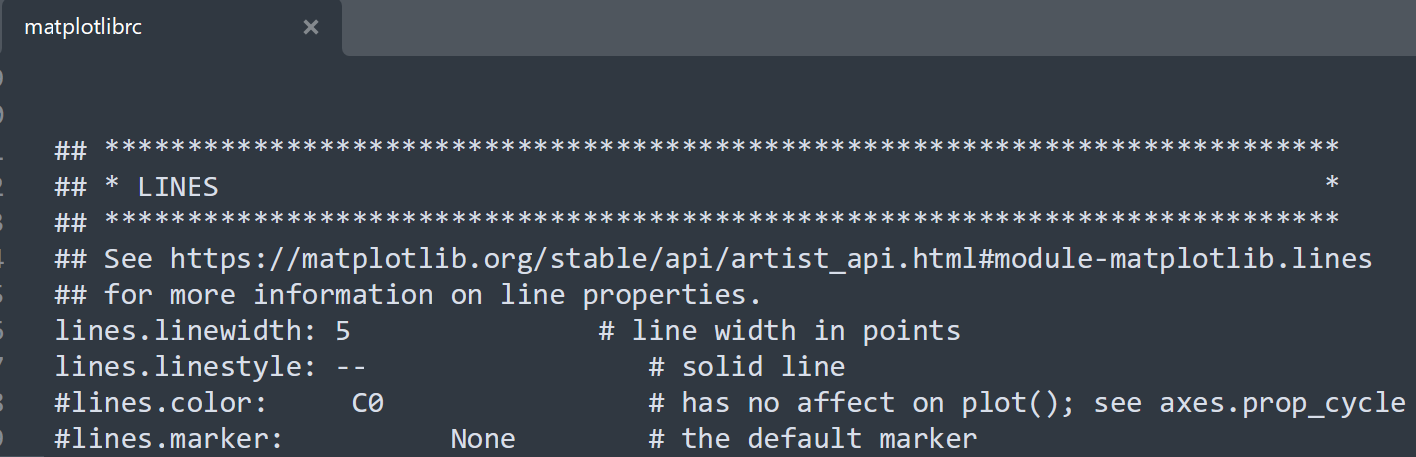
从一个文件中更新设置
img.png

rc_file函数
mpl.rc_file("E:/matplotlibrc")
  ...

rc_context上下文管理器

Customizing Matplotlib with style sheets and rcParams — Matplotlib 3.10.1 documentation

matplotlib — Matplotlib 3.10.1 documentation

修改仅在局部有效,也可以用作装饰器来修改函数内的绘图设置。

一般修改
1
2
3
4
5
6
with mpl.rc_context(rc=None, fname=None):
    mpl.rcParams["lines.linewidth"] = 5
    mpl.rcParams["lines.linestyle"] = "--"
    # mpl.rc(group='lines', linewidth=5, linestyle='--')
    # mpl.rc_file("E:/matplotlibrc")
    ...
字典参数
1
2
3
4
5
new_params = {"lines.linewidth": 5,
              "lines.linestyle": "--"}

with mpl.rc_context(rc=new_params, fname=None):
    ...
文件参数
with mpl.rc_context(rc=None, fname="E:/matplotlibrc"):
    ...
函数装饰器
1
2
3
4
5
6
new_params = {"lines.linewidth": 5,
              "lines.linestyle": "--"}

@mpl.rc_context(rc=new_params, fname=None)
def plotting_function():
  ...

样式表(Style Sheets)

Customizing Matplotlib with style sheets and rcParams — Matplotlib 3.10.1 documentation

Style sheets reference — Matplotlib 3.10.1 documentation

matplotlib.style — Matplotlib 3.10.1 documentation

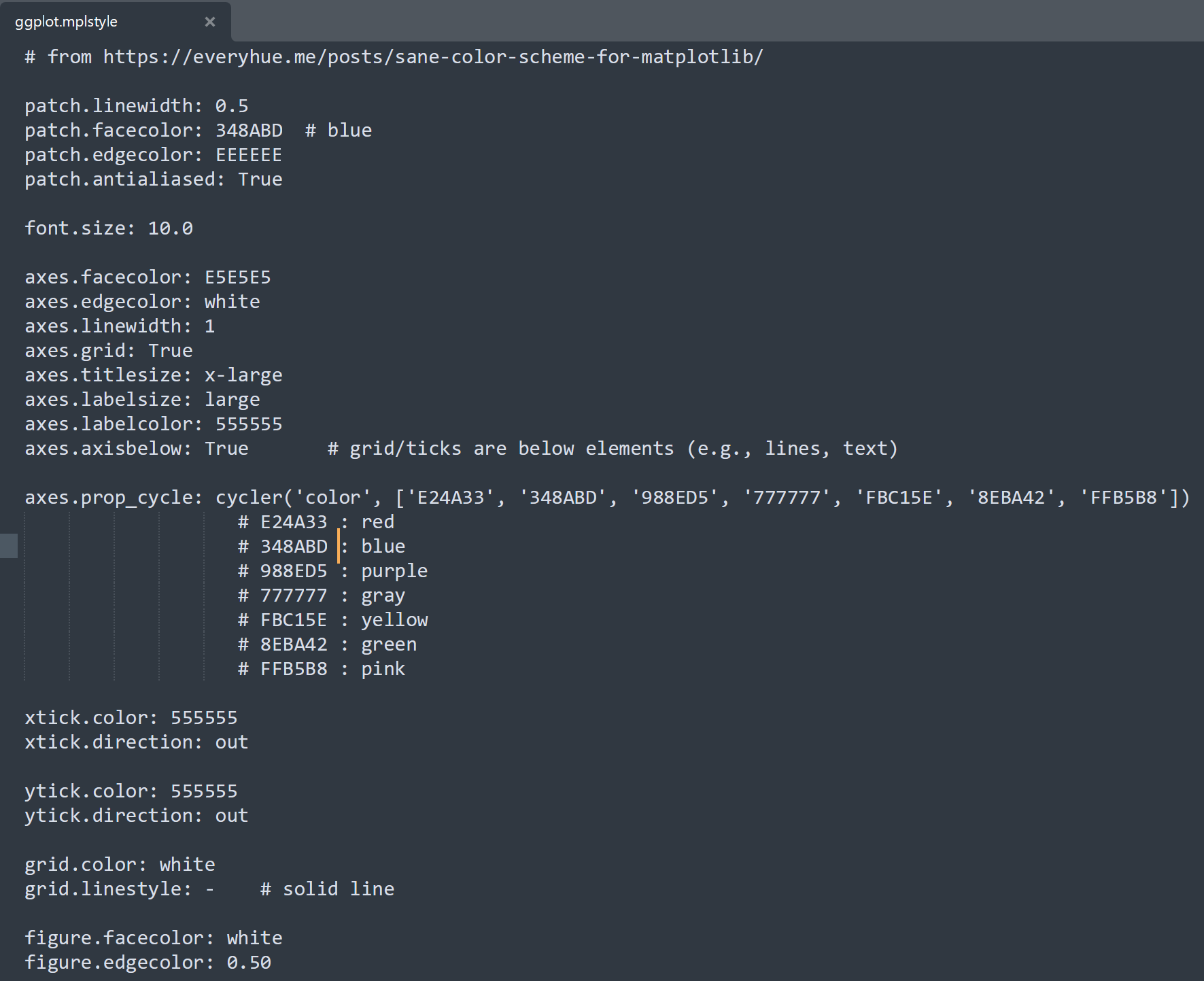
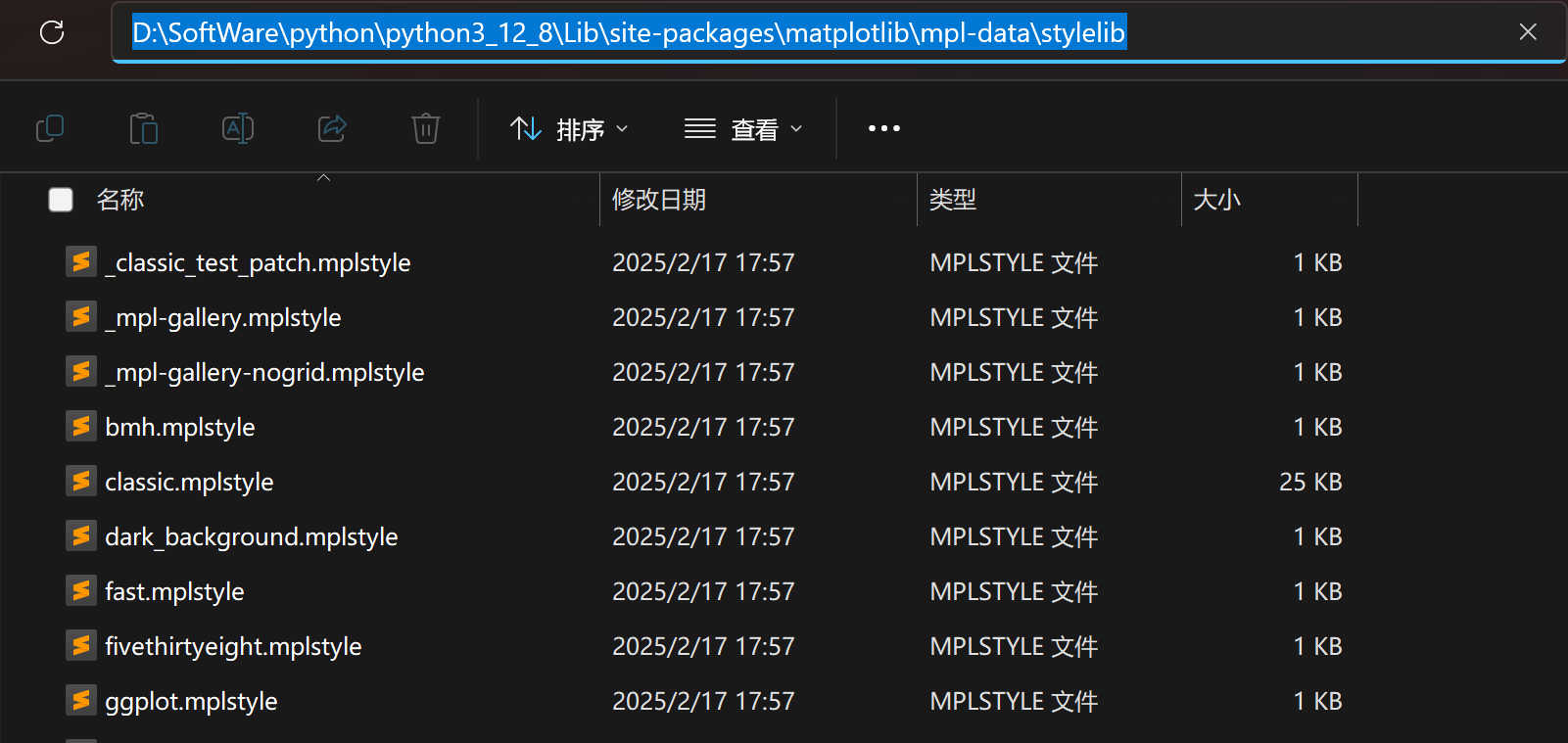
另一种改变图形视觉外观的方法是将 rcParams 设置在一个所谓的样式表中,并通过 mpl.style.useplt.style.use 导入该样式表。这样,可以通过简单地更改导入的样式表来轻松地在不同的样式之间切换。样式表看起来与 matplotlibrc 文件相同,但在样式表中,只能设置与图形实际样式相关的 rcParams。其他 rcParams,如backend,将被忽略,而matplotlibrc 文件支持所有 rcParams。这样做的原因是为了在不同的机器之间使样式表具有可移植性,而无需担心可能在另一台机器上安装或没有安装的依赖项。样式表中的设置优先于 matplotlibrc 文件中的设置。

内置的样式表文件存放在"python安装目录\Lib\site-packages\matplotlib\mpl-data\stylelib"目录下,以.mplstyle为后缀。
img.png

img.png

样式表(Style Sheets)
  1
  2
  3
  4
  5
  6
  7
  8
  9
 10
 11
 12
 13
 14
 15
 16
 17
 18
 19
 20
 21
 22
 23
 24
 25
 26
 27
 28
 29
 30
 31
 32
 33
 34
 35
 36
 37
 38
 39
 40
 41
 42
 43
 44
 45
 46
 47
 48
 49
 50
 51
 52
 53
 54
 55
 56
 57
 58
 59
 60
 61
 62
 63
 64
 65
 66
 67
 68
 69
 70
 71
 72
 73
 74
 75
 76
 77
 78
 79
 80
 81
 82
 83
 84
 85
 86
 87
 88
 89
 90
 91
 92
 93
 94
 95
 96
 97
 98
 99
100
101
102
103
104
105
106
107
108
109
110
111
112
113
114
115
116
117
118
119
120
121
122
123
124
125
126
127
128
129
130
131
132
133
134
135
136
137
138
139
140
141
142
143
144
145
146
147
148
149
150
151
152
153
154
155
156
157
158
159
160
161
162
163
164
165
166
167
168
169
170
171
172
173
174
175
176
177
178
179
180
181
182
183
184
185
186
187
188
189
190
191
192
193
194
195
196
197
198
199
200
201
202
203
204
205
206
207
208
209
210
211
212
213
214
215
216
217
218
219
220
221
222
223
224
225
226
227
228
229
230
231
232
233
234
235
236
237
238
239
240
241
242
243
244
245
246
247
248
249
250
251
252
253
254
255
256
257
258
259
260
261
262
263
264
265
266
267
268
269
270
271
272
273
274
275
276
277
278
279
280
281
282
283
284
285
286
287
288
289
290
291
292
293
294
295
296
297
298
299
300
301
302
303
304
305
306
307
308
309
310
311
312
313
314
315
316
317
318
319
320
321
322
323
324
325
326
327
328
329
330
331
332
333
334
335
336
337
338
339
340
341
342
343
344
345
346
347
348
349
350
351
352
353
354
355
356
357
358
359
360
361
362
363
364
365
366
367
368
369
370
371
372
373
374
375
376
377
378
379
380
381
382
383
384
385
386
387
388
389
390
391
392
393
394
395
396
397
398
399
400
401
402
403
404
405
406
407
408
409
410
411
412
413
414
415
416
417
418
419
420
421
422
423
424
425
426
427
428
429
430
431
432
433
434
435
436
437
438
439
440
441
442
443
444
445
446
447
448
449
450
451
452
453
454
455
456
457
458
459
460
461
462
463
464
465
466
467
468
469
470
471
472
473
474
475
476
477
478
479
480
481
482
483
484
485
486
487
488
489
490
491
492
493
494
495
496
497
498
499
500
501
502
503
504
505
506
507
508
509
510
511
512
513
514
515
516
517
518
519
520
521
522
523
524
525
526
527
528
529
530
531
532
533
534
535
536
537
538
539
540
541
542
543
544
545
546
547
548
549
550
551
552
553
554
555
556
557
558
559
560
561
562
563
564
565
566
567
568
569
570
571
572
573
574
575
576
577
578
579
580
581
582
583
584
585
586
587
588
589
590
591
592
593
594
595
596
597
598
599
600
601
602
603
604
605
606
607
608
609
610
611
612
613
614
615
616
617
618
619
620
621
622
623
624
625
626
627
628
629
630
631
632
633
634
635
636
637
638
639
640
641
642
643
644
645
646
647
648
649
650
651
652
653
654
655
656
657
658
659
660
661
662
663
664
665
666
667
668
669
670
671
672
673
674
675
676
677
678
679
680
681
682
683
684
685
686
687
688
689
690
691
692
693
694
695
696
697
698
699
700
701
702
703
704
705
706
707
708
709
710
711
712
713
714
715
716
717
718
719
720
721
722
723
724
725
726
727
728
729
730
731
732
733
734
735
736
737
mpl.style.available
"""
['Solarize_Light2', '_classic_test_patch', '_mpl-gallery', '_mpl-gallery-nogrid', 'bmh',
 'classic', 'dark_background', 'fast', 'fivethirtyeight', 'ggplot',
 'grayscale', 'petroff10', 'seaborn-v0_8', 'seaborn-v0_8-bright', 'seaborn-v0_8-colorblind', 
 'seaborn-v0_8-dark', 'seaborn-v0_8-dark-palette', 'seaborn-v0_8-darkgrid', 'seaborn-v0_8-deep', 
 'seaborn-v0_8-muted', 'seaborn-v0_8-notebook', 'seaborn-v0_8-paper', 'seaborn-v0_8-pastel', 
 'seaborn-v0_8-poster', 'seaborn-v0_8-talk', 'seaborn-v0_8-ticks', 'seaborn-v0_8-white', 
 'seaborn-v0_8-whitegrid','tableau-colorblind10']
"""

mpl.style.library
"""
{'bmh': RcParams({'axes.edgecolor': '#bcbcbc',
           'axes.facecolor': '#eeeeee',
           'axes.grid': True,
           'axes.labelsize': 'large',
           'axes.prop_cycle': cycler('color', ['#348ABD', '#A60628', '#7A68A6', '#467821', '#D55E00', '#CC79A7', '#56B4E9', '#009E73', '#F0E442', '#0072B2']),
           'axes.titlesize': 'x-large',
           'grid.color': '#b2b2b2',
           'grid.linestyle': '--',
           'grid.linewidth': 0.5,
           'legend.fancybox': True,
           'lines.linewidth': 2.0,
           'mathtext.fontset': 'cm',
           'patch.antialiased': True,
           'patch.edgecolor': '#eeeeee',
           'patch.facecolor': 'blue',
           'patch.linewidth': 0.5,
           'text.hinting_factor': 8,
           'xtick.direction': 'in',
           'ytick.direction': 'in'}),
 'classic': RcParams({'_internal.classic_mode': True,
           'agg.path.chunksize': 0,
           'animation.bitrate': -1,
           'animation.codec': 'mpeg4',
           'animation.convert_args': [],
           'animation.convert_path': 'convert',
           'animation.ffmpeg_args': [],
           'animation.ffmpeg_path': 'ffmpeg',
           'animation.frame_format': 'png',
           'animation.html': 'none',
           'animation.writer': 'ffmpeg',
           'axes.autolimit_mode': 'round_numbers',
           'axes.axisbelow': False,
           'axes.edgecolor': 'k',
           'axes.facecolor': 'w',
           'axes.formatter.limits': [-7, 7],
           'axes.formatter.offset_threshold': 2,
           'axes.formatter.use_locale': False,
           'axes.formatter.use_mathtext': False,
           'axes.formatter.useoffset': True,
           'axes.grid': False,
           'axes.grid.axis': 'both',
           'axes.grid.which': 'major',
           'axes.labelcolor': 'k',
           'axes.labelpad': 5.0,
           'axes.labelsize': 'medium',
           'axes.labelweight': 'normal',
           'axes.linewidth': 1.0,
           'axes.prop_cycle': cycler('color', ['b', 'g', 'r', 'c', 'm', 'y', 'k']),
           'axes.spines.bottom': True,
           'axes.spines.left': True,
           'axes.spines.right': True,
           'axes.spines.top': True,
           'axes.titlepad': 5.0,
           'axes.titlesize': 'large',
           'axes.titleweight': 'normal',
           'axes.titley': 1.0,
           'axes.unicode_minus': True,
           'axes.xmargin': 0.0,
           'axes.ymargin': 0.0,
           'axes3d.automargin': False,
           'axes3d.grid': True,
           'boxplot.bootstrap': None,
           'boxplot.boxprops.color': 'b',
           'boxplot.boxprops.linestyle': '-',
           'boxplot.boxprops.linewidth': 1.0,
           'boxplot.capprops.color': 'k',
           'boxplot.capprops.linestyle': '-',
           'boxplot.capprops.linewidth': 1.0,
           'boxplot.flierprops.color': 'b',
           'boxplot.flierprops.linestyle': 'none',
           'boxplot.flierprops.linewidth': 1.0,
           'boxplot.flierprops.marker': '+',
           'boxplot.flierprops.markeredgecolor': 'k',
           'boxplot.flierprops.markerfacecolor': 'auto',
           'boxplot.flierprops.markersize': 6.0,
           'boxplot.meanline': False,
           'boxplot.meanprops.color': 'r',
           'boxplot.meanprops.linestyle': '-',
           'boxplot.meanprops.linewidth': 1.0,
           'boxplot.meanprops.marker': 's',
           'boxplot.meanprops.markeredgecolor': 'k',
           'boxplot.meanprops.markerfacecolor': 'r',
           'boxplot.meanprops.markersize': 6.0,
           'boxplot.medianprops.color': 'r',
           'boxplot.medianprops.linestyle': '-',
           'boxplot.medianprops.linewidth': 1.0,
           'boxplot.notch': False,
           'boxplot.patchartist': False,
           'boxplot.showbox': True,
           'boxplot.showcaps': True,
           'boxplot.showfliers': True,
           'boxplot.showmeans': False,
           'boxplot.whiskerprops.color': 'b',
           'boxplot.whiskerprops.linestyle': '--',
           'boxplot.whiskerprops.linewidth': 1.0,
           'boxplot.whiskers': 1.5,
           'contour.corner_mask': True,
           'contour.negative_linestyle': 'dashed',
           'date.autoformatter.day': '%b %d %Y',
           'date.autoformatter.hour': '%H:%M:%S',
           'date.autoformatter.microsecond': '%H:%M:%S.%f',
           'date.autoformatter.minute': '%H:%M:%S.%f',
           'date.autoformatter.month': '%b %Y',
           'date.autoformatter.second': '%H:%M:%S.%f',
           'date.autoformatter.year': '%Y',
           'date.converter': 'auto',
           'errorbar.capsize': 3.0,
           'figure.autolayout': False,
           'figure.dpi': 80.0,
           'figure.edgecolor': 'w',
           'figure.facecolor': '0.75',
           'figure.figsize': [8.0, 6.0],
           'figure.frameon': True,
           'figure.labelsize': 'medium',
           'figure.labelweight': 'normal',
           'figure.subplot.bottom': 0.1,
           'figure.subplot.hspace': 0.2,
           'figure.subplot.left': 0.125,
           'figure.subplot.right': 0.9,
           'figure.subplot.top': 0.9,
           'figure.subplot.wspace': 0.2,
           'figure.titlesize': 'medium',
           'figure.titleweight': 'normal',
           'font.cursive': ['Apple Chancery',
                            'Textile',
                            'Zapf Chancery',
                            'Sand',
                            'Script MT',
                            'Felipa',
                            'cursive'],
           'font.family': ['sans-serif'],
           'font.fantasy': ['Comic Sans MS',
                            'Chicago',
                            'Charcoal',
                            'ImpactWestern',
                            'xkcd script',
                            'fantasy'],
           'font.monospace': ['DejaVu Sans Mono',
                              'Andale Mono',
                              'Nimbus Mono L',
                              'Courier New',
                              'Courier',
                              'Fixed',
                              'Terminal',
                              'monospace'],
           'font.sans-serif': ['DejaVu Sans',
                               'Lucida Grande',
                               'Verdana',
                               'Geneva',
                               'Lucid',
                               'Arial',
                               'Helvetica',
                               'Avant Garde',
                               'sans-serif'],
           'font.serif': ['DejaVu Serif',
                          'New Century Schoolbook',
                          'Century Schoolbook L',
                          'Utopia',
                          'ITC Bookman',
                          'Bookman',
                          'Nimbus Roman No9 L',
                          'Times New Roman',
                          'Times',
                          'Palatino',
                          'Charter',
                          'serif'],
           'font.size': 12.0,
           'font.stretch': 'normal',
           'font.style': 'normal',
           'font.variant': 'normal',
           'font.weight': 'normal',
           'grid.alpha': 1.0,
           'grid.color': 'k',
           'grid.linestyle': ':',
           'grid.linewidth': 0.5,
           'hatch.color': 'k',
           'hatch.linewidth': 1.0,
           'hist.bins': 10,
           'image.aspect': 'equal',
           'image.cmap': 'jet',
           'image.composite_image': True,
           'image.interpolation': 'bilinear',
           'image.lut': 256,
           'image.origin': 'upper',
           'image.resample': False,
           'keymap.back': ['left', 'c', 'backspace'],
           'keymap.forward': ['right', 'v'],
           'keymap.fullscreen': ['f', 'ctrl+f'],
           'keymap.grid': ['g'],
           'keymap.home': ['h', 'r', 'home'],
           'keymap.pan': ['p'],
           'keymap.quit': ['ctrl+w', 'cmd+w'],
           'keymap.save': ['s', 'ctrl+s'],
           'keymap.xscale': ['k', 'L'],
           'keymap.yscale': ['l'],
           'keymap.zoom': ['o'],
           'legend.borderaxespad': 0.5,
           'legend.borderpad': 0.4,
           'legend.columnspacing': 2.0,
           'legend.edgecolor': 'inherit',
           'legend.facecolor': 'inherit',
           'legend.fancybox': False,
           'legend.fontsize': 'large',
           'legend.framealpha': None,
           'legend.frameon': True,
           'legend.handleheight': 0.7,
           'legend.handlelength': 2.0,
           'legend.handletextpad': 0.8,
           'legend.labelspacing': 0.5,
           'legend.loc': 'upper right',
           'legend.markerscale': 1.0,
           'legend.numpoints': 2,
           'legend.scatterpoints': 3,
           'legend.shadow': False,
           'lines.antialiased': True,
           'lines.color': 'b',
           'lines.dash_capstyle': <CapStyle.butt: 'butt'>,
           'lines.dash_joinstyle': <JoinStyle.round: 'round'>,
           'lines.dashdot_pattern': [3.0, 5.0, 1.0, 5.0],
           'lines.dashed_pattern': [6.0, 6.0],
           'lines.dotted_pattern': [1.0, 3.0],
           'lines.linestyle': '-',
           'lines.linewidth': 1.0,
           'lines.marker': 'None',
           'lines.markeredgecolor': 'auto',
           'lines.markeredgewidth': 0.5,
           'lines.markerfacecolor': 'auto',
           'lines.markersize': 6.0,
           'lines.scale_dashes': False,
           'lines.solid_capstyle': <CapStyle.projecting: 'projecting'>,
           'lines.solid_joinstyle': <JoinStyle.round: 'round'>,
           'markers.fillstyle': 'full',
           'mathtext.bf': 'serif:bold',
           'mathtext.cal': 'cursive',
           'mathtext.default': 'it',
           'mathtext.fallback': 'cm',
           'mathtext.fontset': 'cm',
           'mathtext.it': 'serif:italic',
           'mathtext.rm': 'serif',
           'mathtext.sf': 'sans\\-serif',
           'mathtext.tt': 'monospace',
           'patch.antialiased': True,
           'patch.edgecolor': 'k',
           'patch.facecolor': 'b',
           'patch.force_edgecolor': True,
           'patch.linewidth': 1.0,
           'path.simplify': True,
           'path.simplify_threshold': 0.1111111111111111,
           'path.sketch': None,
           'path.snap': True,
           'pdf.compression': 6,
           'pdf.fonttype': 3,
           'pdf.inheritcolor': False,
           'pdf.use14corefonts': False,
           'pgf.preamble': '',
           'pgf.rcfonts': True,
           'pgf.texsystem': 'xelatex',
           'polaraxes.grid': True,
           'ps.distiller.res': 6000,
           'ps.fonttype': 3,
           'ps.papersize': 'letter',
           'ps.useafm': False,
           'ps.usedistiller': None,
           'savefig.bbox': None,
           'savefig.dpi': 100.0,
           'savefig.edgecolor': 'w',
           'savefig.facecolor': 'w',
           'savefig.format': 'png',
           'savefig.orientation': 'portrait',
           'savefig.pad_inches': 0.1,
           'savefig.transparent': False,
           'scatter.marker': 'o',
           'svg.fonttype': 'path',
           'svg.image_inline': True,
           'text.antialiased': True,
           'text.color': 'k',
           'text.hinting': 'auto',
           'text.hinting_factor': 8,
           'text.latex.preamble': '',
           'text.usetex': False,
           'xtick.alignment': 'center',
           'xtick.bottom': True,
           'xtick.color': 'k',
           'xtick.direction': 'in',
           'xtick.labelsize': 'medium',
           'xtick.major.bottom': True,
           'xtick.major.pad': 4.0,
           'xtick.major.size': 4.0,
           'xtick.major.top': True,
           'xtick.major.width': 0.5,
           'xtick.minor.bottom': True,
           'xtick.minor.pad': 4.0,
           'xtick.minor.size': 2.0,
           'xtick.minor.top': True,
           'xtick.minor.visible': False,
           'xtick.minor.width': 0.5,
           'xtick.top': True,
           'ytick.alignment': 'center',
           'ytick.color': 'k',
           'ytick.direction': 'in',
           'ytick.labelsize': 'medium',
           'ytick.left': True,
           'ytick.major.left': True,
           'ytick.major.pad': 4.0,
           'ytick.major.right': True,
           'ytick.major.size': 4.0,
           'ytick.major.width': 0.5,
           'ytick.minor.left': True,
           'ytick.minor.pad': 4.0,
           'ytick.minor.right': True,
           'ytick.minor.size': 2.0,
           'ytick.minor.visible': False,
           'ytick.minor.width': 0.5,
           'ytick.right': True}),
 'dark_background': RcParams({'axes.edgecolor': 'white',
           'axes.facecolor': 'black',
           'axes.labelcolor': 'white',
           'axes.prop_cycle': cycler('color', ['#8dd3c7', '#feffb3', '#bfbbd9', '#fa8174', '#81b1d2', '#fdb462', '#b3de69', '#bc82bd', '#ccebc4', '#ffed6f']),
           'boxplot.boxprops.color': 'white',
           'boxplot.capprops.color': 'white',
           'boxplot.flierprops.color': 'white',
           'boxplot.flierprops.markeredgecolor': 'white',
           'boxplot.whiskerprops.color': 'white',
           'figure.edgecolor': 'black',
           'figure.facecolor': 'black',
           'grid.color': 'white',
           'lines.color': 'white',
           'patch.edgecolor': 'white',
           'text.color': 'white',
           'xtick.color': 'white',
           'ytick.color': 'white'}),
 'fast': RcParams({'agg.path.chunksize': 10000,
           'path.simplify': True,
           'path.simplify_threshold': 1.0}),
 'fivethirtyeight': RcParams({'axes.axisbelow': True,
           'axes.edgecolor': '#f0f0f0',
           'axes.facecolor': '#f0f0f0',
           'axes.grid': True,
           'axes.labelsize': 'large',
           'axes.linewidth': 3.0,
           'axes.prop_cycle': cycler('color', ['#008fd5', '#fc4f30', '#e5ae38', '#6d904f', '#8b8b8b', '#810f7c']),
           'axes.titlesize': 'x-large',
           'figure.facecolor': '#f0f0f0',
           'figure.subplot.bottom': 0.07,
           'figure.subplot.left': 0.08,
           'figure.subplot.right': 0.95,
           'font.size': 14.0,
           'grid.color': '#cbcbcb',
           'grid.linestyle': '-',
           'grid.linewidth': 1.0,
           'legend.fancybox': True,
           'lines.linewidth': 4.0,
           'lines.solid_capstyle': <CapStyle.butt: 'butt'>,
           'patch.edgecolor': '#f0f0f0',
           'patch.linewidth': 0.5,
           'svg.fonttype': 'path',
           'xtick.major.size': 0.0,
           'xtick.minor.size': 0.0,
           'ytick.major.size': 0.0,
           'ytick.minor.size': 0.0}),
 'ggplot': RcParams({'axes.axisbelow': True,
           'axes.edgecolor': 'white',
           'axes.facecolor': '#E5E5E5',
           'axes.grid': True,
           'axes.labelcolor': '#555555',
           'axes.labelsize': 'large',
           'axes.linewidth': 1.0,
           'axes.prop_cycle': cycler('color', ['#E24A33', '#348ABD', '#988ED5', '#777777', '#FBC15E', '#8EBA42', '#FFB5B8']),
           'axes.titlesize': 'x-large',
           'figure.edgecolor': '0.50',
           'figure.facecolor': 'white',
           'font.size': 10.0,
           'grid.color': 'white',
           'grid.linestyle': '-',
           'patch.antialiased': True,
           'patch.edgecolor': '#EEEEEE',
           'patch.facecolor': '#348ABD',
           'patch.linewidth': 0.5,
           'xtick.color': '#555555',
           'xtick.direction': 'out',
           'ytick.color': '#555555',
           'ytick.direction': 'out'}),
 'grayscale': RcParams({'axes.edgecolor': 'black',
           'axes.facecolor': 'white',
           'axes.labelcolor': 'black',
           'axes.prop_cycle': cycler('color', ['0.00', '0.40', '0.60', '0.70']),
           'figure.edgecolor': 'white',
           'figure.facecolor': '0.75',
           'grid.color': 'black',
           'image.cmap': 'gray',
           'lines.color': 'black',
           'patch.edgecolor': 'black',
           'patch.facecolor': 'gray',
           'savefig.edgecolor': 'white',
           'savefig.facecolor': 'white',
           'text.color': 'black',
           'xtick.color': 'black',
           'ytick.color': 'black'}),
 'petroff10': RcParams({'axes.prop_cycle': cycler('color', ['#3f90da', '#ffa90e', '#bd1f01', '#94a4a2', '#832db6', '#a96b59', '#e76300', '#b9ac70', '#717581', '#92dadd']),
           'patch.facecolor': '#3f90da'}),
 'seaborn-v0_8-bright': RcParams({'axes.prop_cycle': cycler('color', ['#003FFF', '#03ED3A', '#E8000B', '#8A2BE2', '#FFC400', '#00D7FF']),
           'patch.facecolor': '#003FFF'}),
 'seaborn-v0_8-colorblind': RcParams({'axes.prop_cycle': cycler('color', ['#0072B2', '#009E73', '#D55E00', '#CC79A7', '#F0E442', '#56B4E9']),
           'patch.facecolor': '#0072B2'}),
 'seaborn-v0_8-dark-palette': RcParams({'axes.prop_cycle': cycler('color', ['#001C7F', '#017517', '#8C0900', '#7600A1', '#B8860B', '#006374']),
           'patch.facecolor': '#001C7F'}),
 'seaborn-v0_8-dark': RcParams({'axes.axisbelow': True,
           'axes.edgecolor': 'white',
           'axes.facecolor': '#EAEAF2',
           'axes.grid': False,
           'axes.labelcolor': '.15',
           'axes.linewidth': 0.0,
           'figure.facecolor': 'white',
           'font.family': ['sans-serif'],
           'font.sans-serif': ['Arial',
                               'Liberation Sans',
                               'DejaVu Sans',
                               'Bitstream Vera Sans',
                               'sans-serif'],
           'grid.color': 'white',
           'grid.linestyle': '-',
           'image.cmap': 'Greys',
           'legend.frameon': False,
           'legend.numpoints': 1,
           'legend.scatterpoints': 1,
           'lines.solid_capstyle': <CapStyle.round: 'round'>,
           'text.color': '.15',
           'xtick.color': '.15',
           'xtick.direction': 'out',
           'xtick.major.size': 0.0,
           'xtick.minor.size': 0.0,
           'ytick.color': '.15',
           'ytick.direction': 'out',
           'ytick.major.size': 0.0,
           'ytick.minor.size': 0.0}),
 'seaborn-v0_8-darkgrid': RcParams({'axes.axisbelow': True,
           'axes.edgecolor': 'white',
           'axes.facecolor': '#EAEAF2',
           'axes.grid': True,
           'axes.labelcolor': '.15',
           'axes.linewidth': 0.0,
           'figure.facecolor': 'white',
           'font.family': ['sans-serif'],
           'font.sans-serif': ['Arial',
                               'Liberation Sans',
                               'DejaVu Sans',
                               'Bitstream Vera Sans',
                               'sans-serif'],
           'grid.color': 'white',
           'grid.linestyle': '-',
           'image.cmap': 'Greys',
           'legend.frameon': False,
           'legend.numpoints': 1,
           'legend.scatterpoints': 1,
           'lines.solid_capstyle': <CapStyle.round: 'round'>,
           'text.color': '.15',
           'xtick.color': '.15',
           'xtick.direction': 'out',
           'xtick.major.size': 0.0,
           'xtick.minor.size': 0.0,
           'ytick.color': '.15',
           'ytick.direction': 'out',
           'ytick.major.size': 0.0,
           'ytick.minor.size': 0.0}),
 'seaborn-v0_8-deep': RcParams({'axes.prop_cycle': cycler('color', ['#4C72B0', '#55A868', '#C44E52', '#8172B2', '#CCB974', '#64B5CD']),
           'patch.facecolor': '#4C72B0'}),
 'seaborn-v0_8-muted': RcParams({'axes.prop_cycle': cycler('color', ['#4878CF', '#6ACC65', '#D65F5F', '#B47CC7', '#C4AD66', '#77BEDB']),
           'patch.facecolor': '#4878CF'}),
 'seaborn-v0_8-notebook': RcParams({'axes.labelsize': 11.0,
           'axes.titlesize': 12.0,
           'figure.figsize': [8.0, 5.5],
           'grid.linewidth': 1.0,
           'legend.fontsize': 10.0,
           'lines.linewidth': 1.75,
           'lines.markeredgewidth': 0.0,
           'lines.markersize': 7.0,
           'patch.linewidth': 0.3,
           'xtick.labelsize': 10.0,
           'xtick.major.pad': 7.0,
           'xtick.major.width': 1.0,
           'xtick.minor.width': 0.5,
           'ytick.labelsize': 10.0,
           'ytick.major.pad': 7.0,
           'ytick.major.width': 1.0,
           'ytick.minor.width': 0.5}),
 'seaborn-v0_8-paper': RcParams({'axes.labelsize': 8.8,
           'axes.titlesize': 9.6,
           'figure.figsize': [6.4, 4.4],
           'grid.linewidth': 0.8,
           'legend.fontsize': 8.0,
           'lines.linewidth': 1.4,
           'lines.markeredgewidth': 0.0,
           'lines.markersize': 5.6,
           'patch.linewidth': 0.24,
           'xtick.labelsize': 8.0,
           'xtick.major.pad': 5.6,
           'xtick.major.width': 0.8,
           'xtick.minor.width': 0.4,
           'ytick.labelsize': 8.0,
           'ytick.major.pad': 5.6,
           'ytick.major.width': 0.8,
           'ytick.minor.width': 0.4}),
 'seaborn-v0_8-pastel': RcParams({'axes.prop_cycle': cycler('color', ['#92C6FF', '#97F0AA', '#FF9F9A', '#D0BBFF', '#FFFEA3', '#B0E0E6']),
           'patch.facecolor': '#92C6FF'}),
 'seaborn-v0_8-poster': RcParams({'axes.labelsize': 17.6,
           'axes.titlesize': 19.2,
           'figure.figsize': [12.8, 8.8],
           'grid.linewidth': 1.6,
           'legend.fontsize': 16.0,
           'lines.linewidth': 2.8,
           'lines.markeredgewidth': 0.0,
           'lines.markersize': 11.2,
           'patch.linewidth': 0.48,
           'xtick.labelsize': 16.0,
           'xtick.major.pad': 11.2,
           'xtick.major.width': 1.6,
           'xtick.minor.width': 0.8,
           'ytick.labelsize': 16.0,
           'ytick.major.pad': 11.2,
           'ytick.major.width': 1.6,
           'ytick.minor.width': 0.8}),
 'seaborn-v0_8-talk': RcParams({'axes.labelsize': 14.3,
           'axes.titlesize': 15.6,
           'figure.figsize': [10.4, 7.15],
           'grid.linewidth': 1.3,
           'legend.fontsize': 13.0,
           'lines.linewidth': 2.275,
           'lines.markeredgewidth': 0.0,
           'lines.markersize': 9.1,
           'patch.linewidth': 0.39,
           'xtick.labelsize': 13.0,
           'xtick.major.pad': 9.1,
           'xtick.major.width': 1.3,
           'xtick.minor.width': 0.65,
           'ytick.labelsize': 13.0,
           'ytick.major.pad': 9.1,
           'ytick.major.width': 1.3,
           'ytick.minor.width': 0.65}),
 'seaborn-v0_8-ticks': RcParams({'axes.axisbelow': True,
           'axes.edgecolor': '.15',
           'axes.facecolor': 'white',
           'axes.grid': False,
           'axes.labelcolor': '.15',
           'axes.linewidth': 1.25,
           'figure.facecolor': 'white',
           'font.family': ['sans-serif'],
           'font.sans-serif': ['Arial',
                               'Liberation Sans',
                               'DejaVu Sans',
                               'Bitstream Vera Sans',
                               'sans-serif'],
           'grid.color': '.8',
           'grid.linestyle': '-',
           'image.cmap': 'Greys',
           'legend.frameon': False,
           'legend.numpoints': 1,
           'legend.scatterpoints': 1,
           'lines.solid_capstyle': <CapStyle.round: 'round'>,
           'text.color': '.15',
           'xtick.color': '.15',
           'xtick.direction': 'out',
           'xtick.major.size': 6.0,
           'xtick.minor.size': 3.0,
           'ytick.color': '.15',
           'ytick.direction': 'out',
           'ytick.major.size': 6.0,
           'ytick.minor.size': 3.0}),
 'seaborn-v0_8-white': RcParams({'axes.axisbelow': True,
           'axes.edgecolor': '.15',
           'axes.facecolor': 'white',
           'axes.grid': False,
           'axes.labelcolor': '.15',
           'axes.linewidth': 1.25,
           'figure.facecolor': 'white',
           'font.family': ['sans-serif'],
           'font.sans-serif': ['Arial',
                               'Liberation Sans',
                               'DejaVu Sans',
                               'Bitstream Vera Sans',
                               'sans-serif'],
           'grid.color': '.8',
           'grid.linestyle': '-',
           'image.cmap': 'Greys',
           'legend.frameon': False,
           'legend.numpoints': 1,
           'legend.scatterpoints': 1,
           'lines.solid_capstyle': <CapStyle.round: 'round'>,
           'text.color': '.15',
           'xtick.color': '.15',
           'xtick.direction': 'out',
           'xtick.major.size': 0.0,
           'xtick.minor.size': 0.0,
           'ytick.color': '.15',
           'ytick.direction': 'out',
           'ytick.major.size': 0.0,
           'ytick.minor.size': 0.0}),
 'seaborn-v0_8-whitegrid': RcParams({'axes.axisbelow': True,
           'axes.edgecolor': '.8',
           'axes.facecolor': 'white',
           'axes.grid': True,
           'axes.labelcolor': '.15',
           'axes.linewidth': 1.0,
           'figure.facecolor': 'white',
           'font.family': ['sans-serif'],
           'font.sans-serif': ['Arial',
                               'Liberation Sans',
                               'DejaVu Sans',
                               'Bitstream Vera Sans',
                               'sans-serif'],
           'grid.color': '.8',
           'grid.linestyle': '-',
           'image.cmap': 'Greys',
           'legend.frameon': False,
           'legend.numpoints': 1,
           'legend.scatterpoints': 1,
           'lines.solid_capstyle': <CapStyle.round: 'round'>,
           'text.color': '.15',
           'xtick.color': '.15',
           'xtick.direction': 'out',
           'xtick.major.size': 0.0,
           'xtick.minor.size': 0.0,
           'ytick.color': '.15',
           'ytick.direction': 'out',
           'ytick.major.size': 0.0,
           'ytick.minor.size': 0.0}),
 'seaborn-v0_8': RcParams({'axes.axisbelow': True,
           'axes.edgecolor': 'white',
           'axes.facecolor': '#EAEAF2',
           'axes.grid': True,
           'axes.labelcolor': '.15',
           'axes.labelsize': 11.0,
           'axes.linewidth': 0.0,
           'axes.prop_cycle': cycler('color', ['#4C72B0', '#55A868', '#C44E52', '#8172B2', '#CCB974', '#64B5CD']),
           'axes.titlesize': 12.0,
           'figure.facecolor': 'white',
           'figure.figsize': [8.0, 5.5],
           'font.family': ['sans-serif'],
           'font.sans-serif': ['Arial',
                               'Liberation Sans',
                               'DejaVu Sans',
                               'Bitstream Vera Sans',
                               'sans-serif'],
           'grid.color': 'white',
           'grid.linestyle': '-',
           'grid.linewidth': 1.0,
           'image.cmap': 'Greys',
           'legend.fontsize': 10.0,
           'legend.frameon': False,
           'legend.numpoints': 1,
           'legend.scatterpoints': 1,
           'lines.linewidth': 1.75,
           'lines.markeredgewidth': 0.0,
           'lines.markersize': 7.0,
           'lines.solid_capstyle': <CapStyle.round: 'round'>,
           'patch.facecolor': '#4C72B0',
           'patch.linewidth': 0.3,
           'text.color': '.15',
           'xtick.color': '.15',
           'xtick.direction': 'out',
           'xtick.labelsize': 10.0,
           'xtick.major.pad': 7.0,
           'xtick.major.size': 0.0,
           'xtick.major.width': 1.0,
           'xtick.minor.size': 0.0,
           'xtick.minor.width': 0.5,
           'ytick.color': '.15',
           'ytick.direction': 'out',
           'ytick.labelsize': 10.0,
           'ytick.major.pad': 7.0,
           'ytick.major.size': 0.0,
           'ytick.major.width': 1.0,
           'ytick.minor.size': 0.0,
           'ytick.minor.width': 0.5}),
 'Solarize_Light2': RcParams({'axes.axisbelow': True,
           'axes.edgecolor': '#eee8d5',
           'axes.facecolor': '#eee8d5',
           'axes.grid': True,
           'axes.labelcolor': '#657b83',
           'axes.labelsize': 12.0,
           'axes.prop_cycle': cycler('color', ['#268BD2', '#2AA198', '#859900', '#B58900', '#CB4B16', '#DC322F', '#D33682', '#6C71C4']),
           'axes.titlesize': 16.0,
           'figure.facecolor': '#FDF6E3',
           'grid.color': '#fdf6e3',
           'grid.linestyle': '-',
           'grid.linewidth': 1.0,
           'lines.linewidth': 2.0,
           'lines.solid_capstyle': <CapStyle.butt: 'butt'>,
           'patch.antialiased': True,
           'xtick.color': '#657b83',
           'xtick.direction': 'out',
           'ytick.color': '#657b83',
           'ytick.direction': 'out'}),
 'tableau-colorblind10': RcParams({'axes.prop_cycle': cycler('color', ['#006BA4', '#FF800E', '#ABABAB', '#595959', '#5F9ED1', '#C85200', '#898989', '#A2C8EC', '#FFBC79', '#CFCFCF']),
           'patch.facecolor': '#006BA4'}),
 '_classic_test_patch': RcParams({'text.kerning_factor': 6, 'ytick.alignment': 'center_baseline'}),
 '_mpl-gallery-nogrid': RcParams({'axes.axisbelow': True,
           'axes.grid': False,
           'axes.prop_cycle': cycler('color', ['#1f77b4', '#82bbdb', '#ccdff1']),
           'figure.figsize': [2.0, 2.0],
           'figure.subplot.bottom': 0.01,
           'figure.subplot.left': 0.01,
           'figure.subplot.right': 0.99,
           'figure.subplot.top': 0.99,
           'image.cmap': 'Blues',
           'xtick.major.size': 0.0,
           'ytick.major.size': 0.0}),
 '_mpl-gallery': RcParams({'axes.axisbelow': True,
           'axes.grid': True,
           'axes.prop_cycle': cycler('color', ['#1f77b4', '#58a1cf', '#abd0e6']),
           'figure.figsize': [2.0, 2.0],
           'figure.subplot.bottom': 0.01,
           'figure.subplot.left': 0.01,
           'figure.subplot.right': 0.99,
           'figure.subplot.top': 0.99,
           'image.cmap': 'Blues',
           'xtick.major.size': 0.0,
           'ytick.major.size': 0.0})}
"""

# 可通过环境变量MPLCONFIGDIR更改
mpl.get_configdir()
"""
'D:\\SoftWare\\python\\python3_12_8\\Lib\\site-packages\\matplotlib\\mpl-data'
"""

img.png

img.png

img.png

img.png

img.png

img.png

img.png

img.png

img.png

img.png

img.png

img.png

img.png

img.png

img.png

img.png

img.png

img.png

img.png

img.png

img.png

img.png

img.png

img.png

img.png

img.png

img.png

可以通过mpl.style.useplt.style.use导入一个或多个样式(以列表形式传入多个样式表时,后一个样式表的样式将会覆盖前一个样式表中已经定义的样式)。内置的样式表可以通过名称直接导入。自定义的的样式表可以通过文件路径导入。当把自定义样式表放入mpl.get_configdir()/stylelib目录下时,也可以通过名称进行导入。注意名称尽量不要与内置样式表名称相同,这会覆盖内置样式表。同样,通过mpl.style.contextplt.style.context上下文管理器实现局部修改样式。导入样式表后将会更新mpl.rcParams字典,所以此时再更改mpl.rcParams将是在该样式表的基础上的更改。

样式表应用
1
2
3
4
5
mpl.style.use('ggplot')
...

with mpl.style.context('ggplot', after_reset=False):
  ...

恢复默认设置

  1. mpl.rc_file_defaults()

    matplotlib — Matplotlib 3.10.1 documentation

    恢复由 Matplotlib 加载的原始 rc 文件中的设置

  2. mpl.rcdefaults()

    matplotlib — Matplotlib 3.10.1 documentation

    恢复 Matplotlib 内部默认样式中的设置

  3. mpl.style.use('default')

常用设置

常用设置
mpl.rcParams['font.sans-serif']=['SimHei']  # 设置中文字体
mpl.rcParams['axes.unicode_minus']=False    # 正常显示负号

Note

  1. SimHei中易黑体
  2. Kaiti中文楷体
  3. Lisu中文隶书
  4. FangSong中文仿宋
  5. YouYuan中文幼圆
  6. STSong华文宋体

属性循环的应用

cycler.cycler — cycler 0.12.1 documentation

Styling with cycler — Matplotlib 3.10.1 documentation

自定义属性循环设置可以控制在一个Axes中多组绘图的颜色和其他样式属性。

  1. mpl.rcParams["axes.prop_cycle"]=cycle:所有Axes

  2. Axes.set_prop_cycle(cycle):指定Axes

from cycler import cycler

x = np.linspace(1, 100, 100)

fig = plt.figure(figsize=(8, 8), dpi=100, layout="constrained")
ax = fig.add_subplot(1, 1, 1)
ax.set_prop_cycle(cycle)

ax.plot(x, x)
ax.plot(x, 2*x)
ax.plot(x, 3*x)
ax.plot(x, 4*x)

plt.show()
默认属性循环
cycle = mpl.rcParams["axes.prop_cycle"]
"""
cycler('color', ['#1f77b4', '#ff7f0e', '#2ca02c', '#d62728', '#9467bd', '#8c564b', '#e377c2', '#7f7f7f', '#bcbd22', '#17becf'])
"""
for i in cycle:
  print(i)
"""
{'color': '#1f77b4'}
{'color': '#ff7f0e'}
{'color': '#2ca02c'}
{'color': '#d62728'}
{'color': '#9467bd'}
{'color': '#8c564b'}
{'color': '#e377c2'}
{'color': '#7f7f7f'}
{'color': '#bcbd22'}
{'color': '#17becf'}
"""

img.png

自定义属性循环1
cycle = cycler(color=['b', 'g', 'r', 'c'], linestyle=['-', '--', '-.', ':'])
"""
(cycler('color', ['b', 'g', 'r', 'c']) + cycler('linestyle', ['-', '--', '-.', ':']))
"""
for i in cycle:
    print(i)
"""
{'color': 'b', 'linestyle': '-'}
{'color': 'g', 'linestyle': '--'}
{'color': 'r', 'linestyle': '-.'}
{'color': 'c', 'linestyle': ':'}
"""

img.png

自定义属性循环2
cycle = cycler(color=['b', 'g', 'r', 'c']) + cycler(linestyle=['-', '--', '-.', ':'])
"""
(cycler('color', ['b', 'g', 'r', 'c']) + cycler('linestyle', ['-', '--', '-.', ':']))
"""
for i in cycle:
    print(i)
"""
{'color': 'b', 'linestyle': '-'}
{'color': 'g', 'linestyle': '--'}
{'color': 'r', 'linestyle': '-.'}
{'color': 'c', 'linestyle': ':'}
"""

img.png

自定义属性循环3
cycle = cycler(color=['b', 'g', 'r', 'c']) * cycler(linestyle=['-', '--', '-.', ':'])
"""
(cycler('color', ['b', 'g', 'r', 'c']) * cycler('linestyle', ['-', '--', '-.', ':']))
"""
for i in cycle:
    print(i)
"""
{'color': 'b', 'linestyle': '-'}
{'color': 'b', 'linestyle': '--'}
{'color': 'b', 'linestyle': '-.'}
{'color': 'b', 'linestyle': ':'}
{'color': 'g', 'linestyle': '-'}
{'color': 'g', 'linestyle': '--'}
{'color': 'g', 'linestyle': '-.'}
{'color': 'g', 'linestyle': ':'}
{'color': 'r', 'linestyle': '-'}
{'color': 'r', 'linestyle': '--'}
{'color': 'r', 'linestyle': '-.'}
{'color': 'r', 'linestyle': ':'}
{'color': 'c', 'linestyle': '-'}
{'color': 'c', 'linestyle': '--'}
{'color': 'c', 'linestyle': '-.'}
{'color': 'c', 'linestyle': ':'}
"""

img.png

Seaborn

比例尺度(Context)

Controlling figure aesthetics — seaborn 0.13.2 documentation

seanborn内置了四套context设置,分别为 paper, notebook(默认), talk, poster

img.png

plotting_context

seaborn.plotting_context — seaborn 0.13.2 documentation

sns.plotting_context(context=None, font_scale=1, rc=None)

获取context参数或上下文管理context参数。

  1. context:自定义参数字典或预设配置集的名称。默认'notebook'。

  2. font_scale:独立设置预设字体参数缩放。

  3. rc:自定义参数字典,覆盖对应预设参数。

参数获取
sns.plotting_context(context=None, font_scale=1, rc=None)
"""
{'font.size': 12.0,
 'axes.labelsize': 12.0,
 'axes.titlesize': 12.0,
 'xtick.labelsize': 11.0,
 'ytick.labelsize': 11.0,
 'legend.fontsize': 11.0,
 'legend.title_fontsize': 12.0,
 'axes.linewidth': 1.25,
 'grid.linewidth': 1.0,
 'lines.linewidth': 1.5,
 'lines.markersize': 6.0,
 'patch.linewidth': 1.0,
 'xtick.major.width': 1.25,
 'ytick.major.width': 1.25,
 'xtick.minor.width': 1.0,
 'ytick.minor.width': 1.0,
 'xtick.major.size': 6.0,
 'ytick.major.size': 6.0,
 'xtick.minor.size': 4.0,
 'ytick.minor.size': 4.0}
"""

sns.plotting_context(context="notebook", font_scale=1, rc=None)
"""
{'axes.linewidth': 1.25,
 'grid.linewidth': 1,
 'lines.linewidth': 1.5,
 'lines.markersize': 6,
 'patch.linewidth': 1,
 'xtick.major.width': 1.25,
 'ytick.major.width': 1.25,
 'xtick.minor.width': 1,
 'ytick.minor.width': 1,
 'xtick.major.size': 6,
 'ytick.major.size': 6,
 'xtick.minor.size': 4,
 'ytick.minor.size': 4,
 'font.size': 12,
 'axes.labelsize': 12,
 'axes.titlesize': 12,
 'xtick.labelsize': 11,
 'ytick.labelsize': 11,
 'legend.fontsize': 11,
 'legend.title_fontsize': 12}
"""

sns.plotting_context(context="notebook", font_scale=2, rc=None)
"""
{'axes.linewidth': 1.25,
 'grid.linewidth': 1,
 'lines.linewidth': 1.5,
 'lines.markersize': 6,
 'patch.linewidth': 1,
 'xtick.major.width': 1.25,
 'ytick.major.width': 1.25,
 'xtick.minor.width': 1,
 'ytick.minor.width': 1,
 'xtick.major.size': 6,
 'ytick.major.size': 6,
 'xtick.minor.size': 4,
 'ytick.minor.size': 4,
 'font.size': 24,
 'axes.labelsize': 24,
 'axes.titlesize': 24,
 'xtick.labelsize': 22,
 'ytick.labelsize': 22,
 'legend.fontsize': 22,
 'legend.title_fontsize': 24}
"""

sns.plotting_context(context="notebook", font_scale=1, rc={"axes.linewidth": 2})
"""
{'axes.linewidth': 2,
 'grid.linewidth': 1,
 'lines.linewidth': 1.5,
 'lines.markersize': 6,
 'patch.linewidth': 1,
 'xtick.major.width': 1.25,
 'ytick.major.width': 1.25,
 'xtick.minor.width': 1,
 'ytick.minor.width': 1,
 'xtick.major.size': 6,
 'ytick.major.size': 6,
 'xtick.minor.size': 4,
 'ytick.minor.size': 4,
 'font.size': 12,
 'axes.labelsize': 12,
 'axes.titlesize': 12,
 'xtick.labelsize': 11,
 'ytick.labelsize': 11,
 'legend.fontsize': 11,
 'legend.title_fontsize': 12}
"""

sns.plotting_context(context={"axes.linewidth": 2})
"""
{'axes.linewidth': 2}
"""
上下文管理
with sns.plotting_context(context=None, font_scale=1, rc=None):
  ...

set_context

seaborn.set_context — seaborn 0.13.2 documentation

sns.set_context(context=None, font_scale=1, rc=None)

全局设置context。参数同上。

set_context
sns.set_context(context=None, font_scale=1, rc=None)
...

风格(Style)

Controlling figure aesthetics — seaborn 0.13.2 documentation

seanborn内置了五套style设置,分别为 darkgrid(默认), whitegrid, dark, white, ticks

img.png

axes_style

seaborn.axes_style — seaborn 0.13.2 documentation

Controlling figure aesthetics — seaborn 0.13.2 documentation

sns.axes_style(style=None, rc=None)

获取style参数或上下文管理style参数。

  1. style:自定义参数字典或预设配置集的名称。默认'darkgrid'。

  2. rc:自定义参数字典,覆盖对应预设参数。

参数获取
sns.axes_style(style=None, rc=None)
"""
{'axes.facecolor': '#EAEAF2',
 'axes.edgecolor': 'white',
 'axes.grid': True,
 'axes.axisbelow': True,
 'axes.labelcolor': '.15',
 'figure.facecolor': 'white',
 'grid.color': 'white',
 'grid.linestyle': '-',
 'text.color': '.15',
 'xtick.color': '.15',
 'ytick.color': '.15',
 'xtick.direction': 'out',
 'ytick.direction': 'out',
 'lines.solid_capstyle': <CapStyle.round: 'round'>,
 'patch.edgecolor': 'w',
 'patch.force_edgecolor': True,
 'image.cmap': 'rocket',
 'font.family': ['sans-serif'],
 'font.sans-serif': ['Arial',
  'DejaVu Sans',
  'Liberation Sans',
  'Bitstream Vera Sans',
  'sans-serif'],
 'xtick.bottom': False,
 'xtick.top': False,
 'ytick.left': False,
 'ytick.right': False,
 'axes.spines.left': True,
 'axes.spines.bottom': True,
 'axes.spines.right': True,
 'axes.spines.top': True}
"""

sns.axes_style(style="darkgrid", rc=None)
"""
{'figure.facecolor': 'white',
 'axes.labelcolor': '.15',
 'xtick.direction': 'out',
 'ytick.direction': 'out',
 'xtick.color': '.15',
 'ytick.color': '.15',
 'axes.axisbelow': True,
 'grid.linestyle': '-',
 'text.color': '.15',
 'font.family': ['sans-serif'],
 'font.sans-serif': ['Arial',
  'DejaVu Sans',
  'Liberation Sans',
  'Bitstream Vera Sans',
  'sans-serif'],
 'lines.solid_capstyle': 'round',
 'patch.edgecolor': 'w',
 'patch.force_edgecolor': True,
 'image.cmap': 'rocket',
 'xtick.top': False,
 'ytick.right': False,
 'axes.grid': True,
 'axes.facecolor': '#EAEAF2',
 'axes.edgecolor': 'white',
 'grid.color': 'white',
 'axes.spines.left': True,
 'axes.spines.bottom': True,
 'axes.spines.right': True,
 'axes.spines.top': True,
 'xtick.bottom': False,
 'ytick.left': False}
"""

sns.axes_style(style="darkgrid", rc={"figure.facecolor": "b"})
"""
{'figure.facecolor': 'b',
 'axes.labelcolor': '.15',
 'xtick.direction': 'out',
 'ytick.direction': 'out',
 'xtick.color': '.15',
 'ytick.color': '.15',
 'axes.axisbelow': True,
 'grid.linestyle': '-',
 'text.color': '.15',
 'font.family': ['sans-serif'],
 'font.sans-serif': ['Arial',
  'DejaVu Sans',
  'Liberation Sans',
  'Bitstream Vera Sans',
  'sans-serif'],
 'lines.solid_capstyle': 'round',
 'patch.edgecolor': 'w',
 'patch.force_edgecolor': True,
 'image.cmap': 'rocket',
 'xtick.top': False,
 'ytick.right': False,
 'axes.grid': True,
 'axes.facecolor': '#EAEAF2',
 'axes.edgecolor': 'white',
 'grid.color': 'white',
 'axes.spines.left': True,
 'axes.spines.bottom': True,
 'axes.spines.right': True,
 'axes.spines.top': True,
 'xtick.bottom': False,
 'ytick.left': False}
"""

sns.axes_style(style={"figure.facecolor": "b"})
"""
{'figure.facecolor': 'b'}
"""
上下文管理
with sns.axes_style(style=None, rc=None):
  ...

set_style

seaborn.set_style — seaborn 0.13.2 documentation

Controlling figure aesthetics — seaborn 0.13.2 documentation

sns.set_style(style=None, rc=None)

全局设置style。参数同上。

set_style
sns.set_style(style=None, rc=None)
...

配色(Palettes)

Choosing color palettes — seaborn 0.13.2 documentation

color_palette

seaborn.color_palette — seaborn 0.13.2 documentation

sns.color_palette(palette=None, n_colors=None, desat=None, as_cmap=False)

查看或构建调色板,返回一个颜色列表或Colormap对象。同样可进行上下文管理,针对默认颜色循环。该函数被任何具有 palette 参数的函数内部使用。

  1. palette

    1. seaborn内置palette

      'deep', 'muted', 'bright', 'pastel', dark', 'colorblind', "rocket" , "mako" , "flare", "crest", "vlag", "icefire"

    2. matplotlib内置colormap

    3. 'husl''hls'

      当有任意数量的类别时,找到独特色调的最简单方法是在圆形色空间中绘制均匀分布的颜色(在这种色空间中,色调变化,同时保持亮度和饱和度不变)

    4. 'ch: <cubehelix arguments> [_r]'

    5. 'light:<color>[_r]', 'dark:<color>[_r]', 'blend:<color>,<color>,...'

    6. 颜色序列

    7. None:返回当前的 matplotlib 颜色循环

  2. n_colors:颜色数。默认为6。大于调色板自身颜色数量时将产生循环。as_cmap为 True时将被忽略。

  3. desat:每种颜色的去饱和比例

  4. as_cmap:True返回Colormap对象;False返回RGB元组列表

sns.color_palette(palette=None, n_colors=None, desat=None, as_cmap=True)
"""
['#1f77b4', '#ff7f0e', '#2ca02c', '#d62728', '#9467bd', '#8c564b', '#e377c2', '#7f7f7f', '#bcbd22', '#17becf']
"""

sns.color_palette(palette="colorblind", n_colors=None, desat=None, as_cmap=True)
"""
['#0173B2', '#DE8F05', '#029E73', '#D55E00', '#CC78BC', '#CA9161', '#FBAFE4', '#949494', '#ECE133', '#56B4E9']
"""

sns.color_palette(palette="viridis", n_colors=None, desat=None, as_cmap=True)
sns.color_palette(palette="husl", n_colors=None, desat=None, as_cmap=True)
sns.color_palette(palette="hls", n_colors=None, desat=None, as_cmap=True)
sns.color_palette(palette="ch: r=0.5", n_colors=None, desat=None, as_cmap=True)
sns.color_palette(palette="dark:red", n_colors=None, desat=None, as_cmap=True)
sns.color_palette(palette="light:red", n_colors=None, desat=None, as_cmap=True)
sns.color_palette(palette="blend:red,blue,yellow", n_colors=None, desat=None, as_cmap=True)
sns.color_palette(palette=["red", "b", "g"], n_colors=None, desat=None, as_cmap=True)
上下文管理
with sns.color_palette(palette=None, n_colors=None, desat=None, as_cmap=False):
  ...

set_palette

seaborn.set_palette — seaborn 0.13.2 documentation

全局设置默认颜色循环

sns.set_palette(palette, n_colors=None, desat=None, color_codes=False)

  1. palette、n_colors、desat:同上

  2. color_codes:如果为True 且palette 是 seaborn内置palette,则将简写颜色代码(例如'b','g','r'等)重新映射到此调色板中的颜色。如下。

set_color_codes

seaborn.set_color_codes — seaborn 0.13.2 documentation

更改matplotlib颜色缩写的解释方式。调用此方法将改变后续图表中对简写代码(如'b'或'g'等)的解析方式。

sns.set_color_codes(palette='deep')

palette参数可选seaborn内置palette(如下图)。
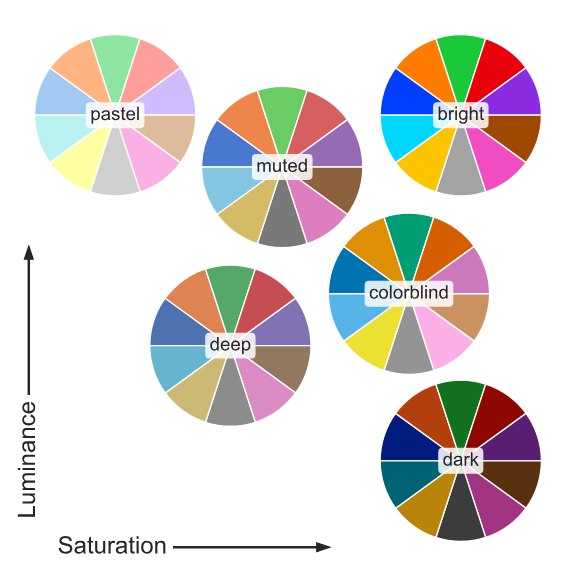
img.png

主题(theme)

seaborn.set_theme — seaborn 0.13.2 documentation

综合设置绘图参数。将影响所有 matplotlib 图表,包括那些未使用 seaborn 制作的图表。

set_theme
sns.set_theme(context='notebook',
              font_scale=1,

              style='darkgrid',

              palette='deep',
              color_codes=True,

              font='sans-serif',

              rc=None    # 可修改任何matplotlib rc参数
              )

恢复设置

seaborn.reset_defaults — seaborn 0.13.2 documentation

seaborn.reset_orig — seaborn 0.13.2 documentation

  1. sns.reset_defaults()

  2. sns.reset_orig()

Comments