Skip to content

文本(Text)、注释(Annotate)、标题(Title)

Text, labels and annotations — Matplotlib 3.10.1 documentation

Properties of Mark objects — seaborn 0.13.2 documentation

导入模块
1
2
3
import matplotlib as mpl
import matplotlib.pyplot as plt
import numpy as np

属性

img.png

img.png

img.png

img.png

文本(Text)

matplotlib.text — Matplotlib 3.10.1 documentation

matplotlib.axes.Axes.text — Matplotlib 3.10.1 documentation

matplotlib.figure.Figure.text — Matplotlib 3.10.1 documentation

matplotlib.pyplot.text — Matplotlib 3.10.1 documentation

Text — Matplotlib 3.10.1 documentation
文本(Text)
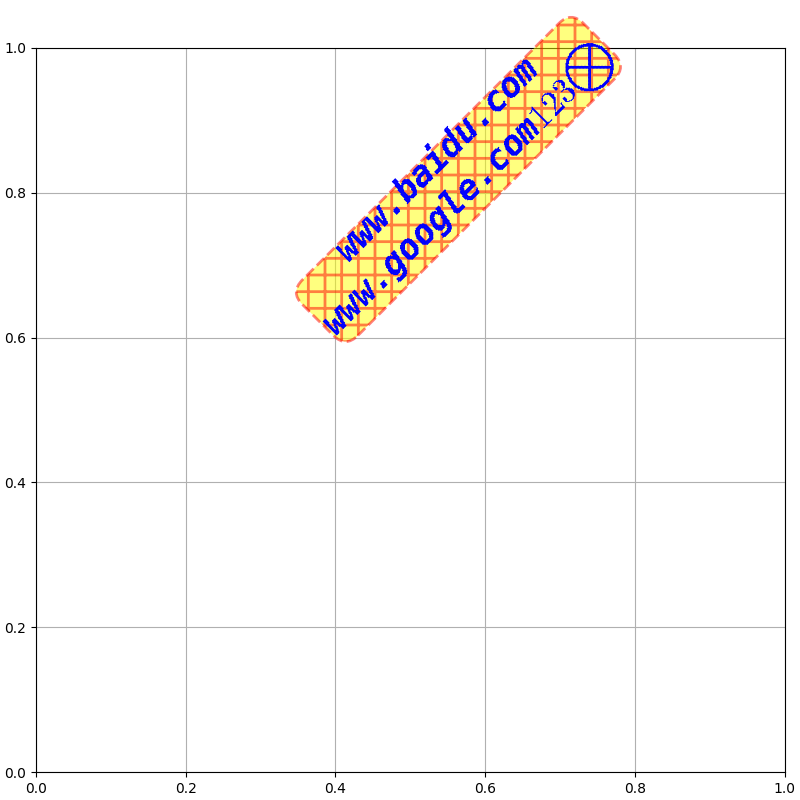
fig = plt.figure(figsize=(8, 8), dpi=100, layout="constrained")
ax = fig.add_subplot(1, 1, 1)

ax.text(s="www.baidu.com\nwww.google.com$123\\bigotimes$",

        # 锚点位置
        x=0.4, y=0.6,
        transform=ax.transAxes,        # 坐标系统,可选Axes.transAxes, Axes.transData(Axes调用下默认), Figure.transFigure(Figure调用下默认)
        transform_rotates_text=False,  #??? transform的旋转是否影响文本方向

        # 对齐方式
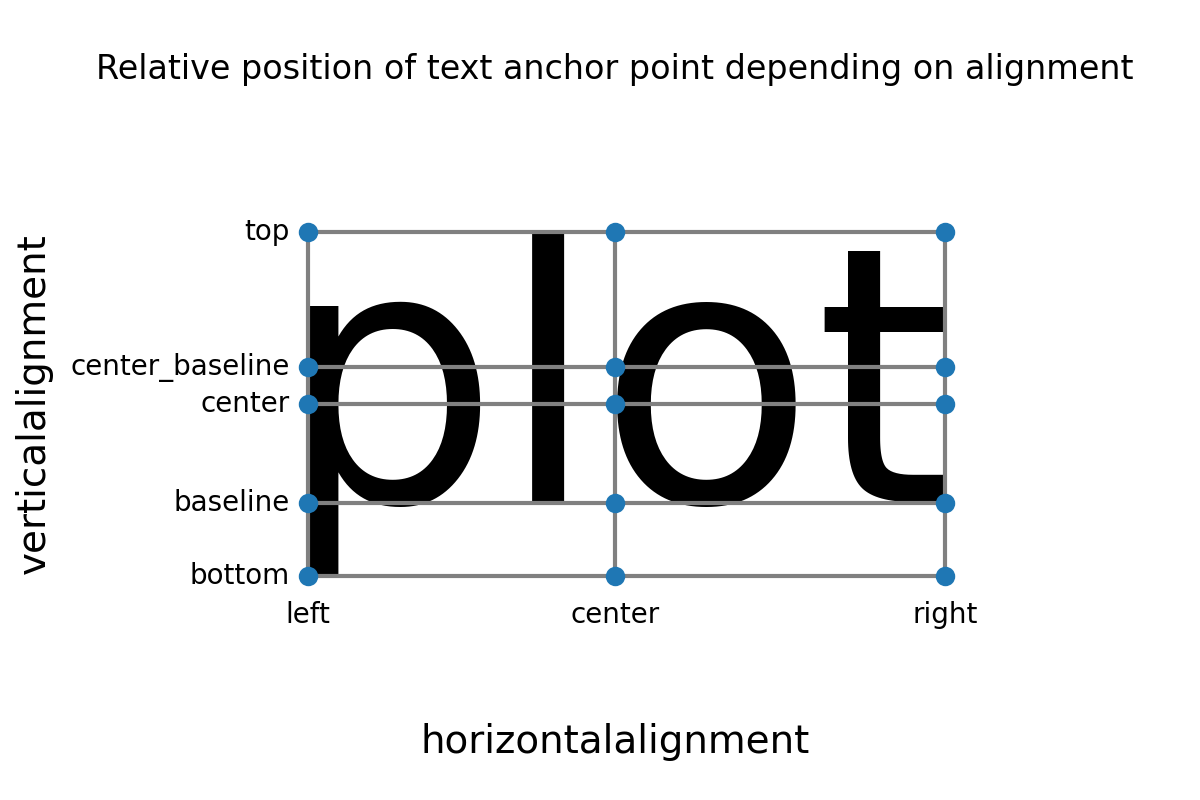
        ha="left",                     # 相对于锚点的水平对齐方式(horizontalalignment/ha): 可选"left"(默认), "right", "center"
        va="baseline",                 # 相对于锚点的垂直对齐方式(verticalalignment/va):可选"baseline"(默认), 'bottom', 'center', 'center_baseline', 'top'
        ma="center",                   # 多行文本间对齐方式(multialignment/ma): 可选'left'(默认), 'right', 'center'

        # 绕锚点旋转
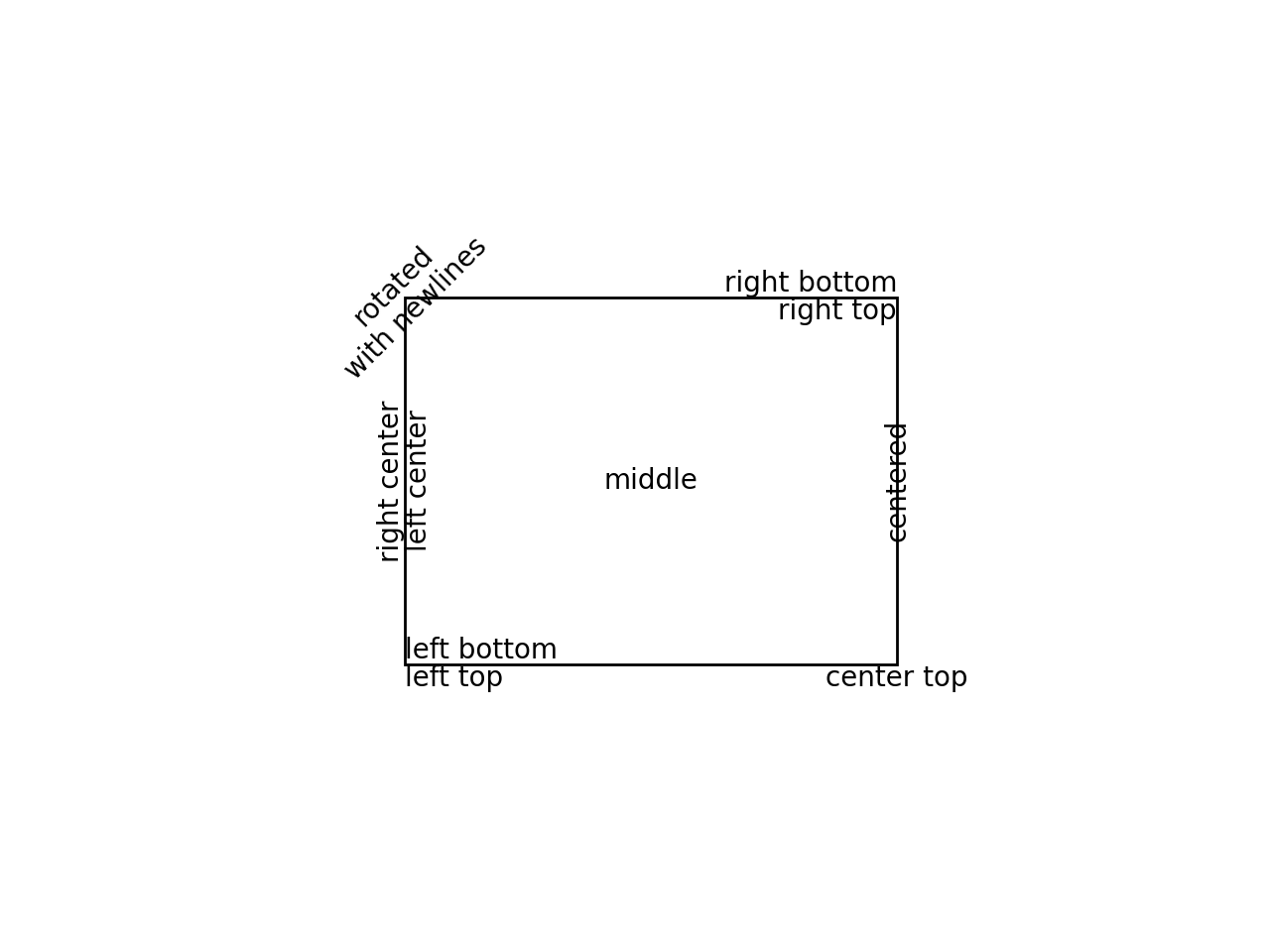
        rotation_mode="anchor",        # 旋转模式: 可选None/'default'(先旋转后对齐), 'anchor'(先对齐后旋转)
        rotation=45,                   # 逆时针旋转度数(°): 可选浮点数, 'horizontal'(0°), 'vertical'(90°)

        # 行间距
        linespacing=1,                 # 行间距(字体大小的倍数),默认1.2

        # 字体
        fontname="monospace",          # 字体名称(fontfamily/family/fontname): 可选'serif', 'sans-serif', 'cursive', 'fantasy', 'monospace'
        fontsize=25,                   # 字体大小(fontsize/size): 可选绝对大小(浮点数)或相对大小('xx-small', 'x-small', 'small', 'medium', 'large', 'x-large', 'xx-large')
        fontstretch="normal",          # 字体拉伸与压缩(fontstretch/stretch): 可选0-1000, 'ultra-condensed', 'extra-condensed', 'condensed', 'semi-condensed', 'normal', 'semi-expanded', 'expanded', 'extra-expanded', 'ultra-expanded'
        fontstyle="italic",            # 字体样式(fontstyle/style): 可选'normal', 'italic', 'oblique'
        fontvariant="normal",          # 字体变体(fontvariant/variant): 可选'normal', 'small-caps'
        fontweight="bold",             # 字体粗细(fontweight/weight): 可选0-1000, 'ultralight', 'light', 'normal', 'regular', 'book', 'medium', 'roman', 'semibold', 'demibold', 'demi', 'bold', 'heavy', 'extra bold', 'black'
        color="blue",                  # 字体颜色(color/c)
        backgroundcolor="yellow",      # 文本背景色,被bbox覆盖
        parse_math=True,               # 是否将$$中的文本解析为LabTex数学文本
        math_fontfamily="cm",          # LabTex数学文本字体: 可选'dejavusans'(默认), 'dejavuserif', 'cm', 'stix', 'stixsans', 'custom'
        alpha=1,                       # 透明度

        # 文本框(FancyBboxPatch)
        bbox={"boxstyle": "round, pad=0, rounding_size=0.5",

              "facecolor": "yellow",
              "linestyle": "--",
              "linewidth": 2,
              "hatch": "+",
              "hatch_linewidth": 2,
              "edgecolor": "red",
              "alpha": 0.5},

        # 其它参数
        wrap=False,                    #??? 是否自动换行以确保文本内容在图形内
        antialiased=False,             # 是否反锯齿渲染
        label=None,                    # 标签文本(用于图例绘制)
        gid=None,                      #??? group id
        visible=True,                  # 是否可见
        in_layout=True,                # 是否加入布局计算
        rasterized=False,              #??? 是否强制栅格化(bitmap)绘制以进行矢量图形输出
        zorder=None                    # 绘制优先级,值越低越优先,越在图层底
        )
ax.grid()

plt.show()

img.png

注释(Annotate)

matplotlib.text — Matplotlib 3.10.1 documentation

matplotlib.axes.Axes.annotate — Matplotlib 3.10.1 documentation

matplotlib.pyplot.annotate — Matplotlib 3.10.1 documentation

Annotations — Matplotlib 3.10.1 documentation

Annotation arrow style reference — Matplotlib 3.10.1 documentation

坐标系统字符串 含义
'figure points' 从Figure左下角开始的点数
'figure pixels' 从Figure左下角开始的像素数
'figure fraction' 从Figure左下角开始的比例
'subfigure points' 从subFigure左下角开始的点数
'subfigure pixels' 从subFigure左下角开始的像素数
'subfigure fraction' 从subFigure左下角开始的比例
'axes points' 从Axes左下角开始的点数
'axes pixels' 从Axes左下角开始的像素数
'axes fraction' 从Axes左下角开始的比例
'data' 使用数据坐标系统
'polar' 使用极坐标系统
'offset points' 从xy参数偏移的点数(仅用于textcoords参数)
'offset pixels' 从xy参数偏移的像素数(仅用于textcoords参数)
'offset fontsize' 相对于字体大小,从xy参数偏移的量(仅用于textcoords参数)
Simple arrow 含义
width 箭身宽
headwidth 箭头宽(以点为单位)
headlength 箭头长(以点为单位)
shrink 箭两端收缩的总长度比例
? 其它任何 FancyArrowPatch属性
Fancy arrow 含义
relpos 确切起始位置(相对于文本框的坐标元组),默认(0.5, 0.5),即文本框中心
arrowstyle 箭样式
connectionstyle 连接样式
shrinkA 起始收缩点数(默认2)
shrinkB 末尾收缩点数(默认2)
patchA 默认text的bounding box
patchB 默认None
mutation_scale /
mutation_aspect /
其它任何 FancyArrowPatch属性
注释(Annotate)
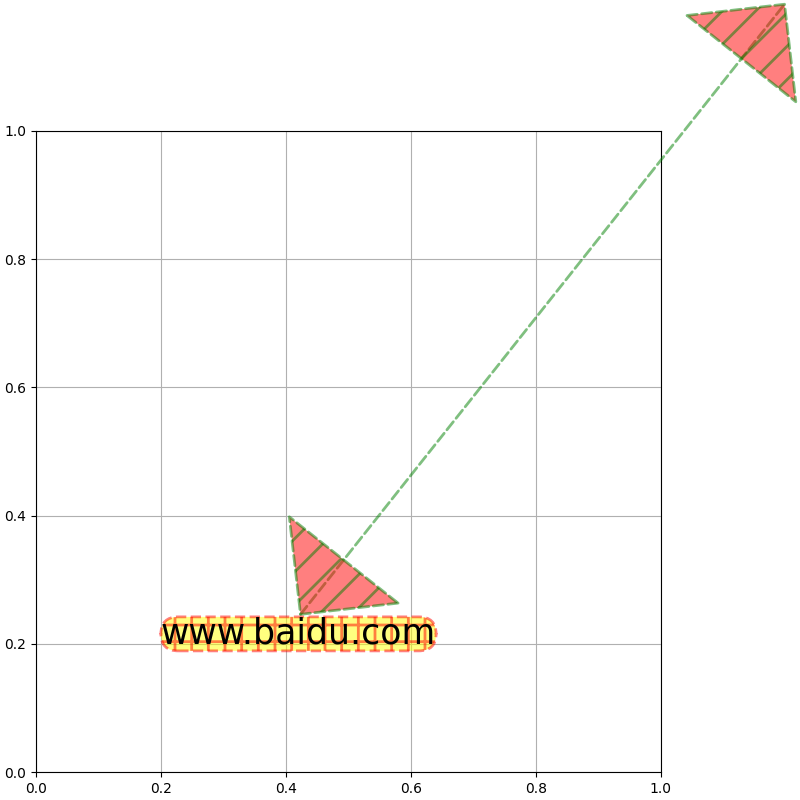
fig = plt.figure(figsize=(8, 8), dpi=100, layout="constrained")
ax = fig.add_subplot(1, 1, 1)

ax.annotate(# 要注释的点
            xy=(1.2, 1.2),                 # 坐标
            xycoords="axes fraction",      # 参考坐标系: 默认'data',可选单个或二元元组形式(分别指定x和y)的字符串、Artist对象、Transform对象、可调用对象

            # 注释文本及位置
            text="www.baidu.com",
            xytext=(0.2, 0.2),             # 坐标: 默认等于xy参数
            textcoords="axes fraction",    # 参考坐标系: 默认同xycoords参数,可选单个或二元元组形式(分别指定x和y)的字符串、Artist对象、Transform对象、可调用对象

            # 文本Text参数
            fontsize=25,
            bbox={"boxstyle": "round, pad=0, rounding_size=0.5",

                  "facecolor": "yellow",
                  "linestyle": "--",
                  "linewidth": 2,
                  "hatch": "+",
                  "hatch_linewidth": 2,
                  "edgecolor": "red",
                  "alpha": 0.5}, 

            # 箭与连接(FancyArrowPatch): Simple arrow模式和Fancy arrow模式
            arrowprops={"relpos": (0.5, 1),

                        "arrowstyle": "<|-|>, head_length=2, head_width=2",
                        "connectionstyle": "arc3, rad=0",
                        "shrinkA": 0,
                        "shrinkB": 0,

                        "facecolor": "red",
                        "linestyle": "--",
                        "linewidth": 2,
                        "hatch": "/",
                        "hatch_linewidth": 2,
                        "edgecolor": "green",
                        "alpha": 0.5},
            annotation_clip=False           # 当要注释的点xy在Axes外时是否选择不绘制
            )
ax.grid()

plt.show()

img.png

标题(Title)

Figure标题(suptitle、supxlabel、supylabel)

matplotlib.figure.Figure.suptitle — Matplotlib 3.10.1 documentation

matplotlib.pyplot.suptitle — Matplotlib 3.10.1 documentation

matplotlib.figure.Figure.supxlabel — Matplotlib 3.10.1 documentation

matplotlib.figure.Figure.supylabel — Matplotlib 3.10.1 documentation
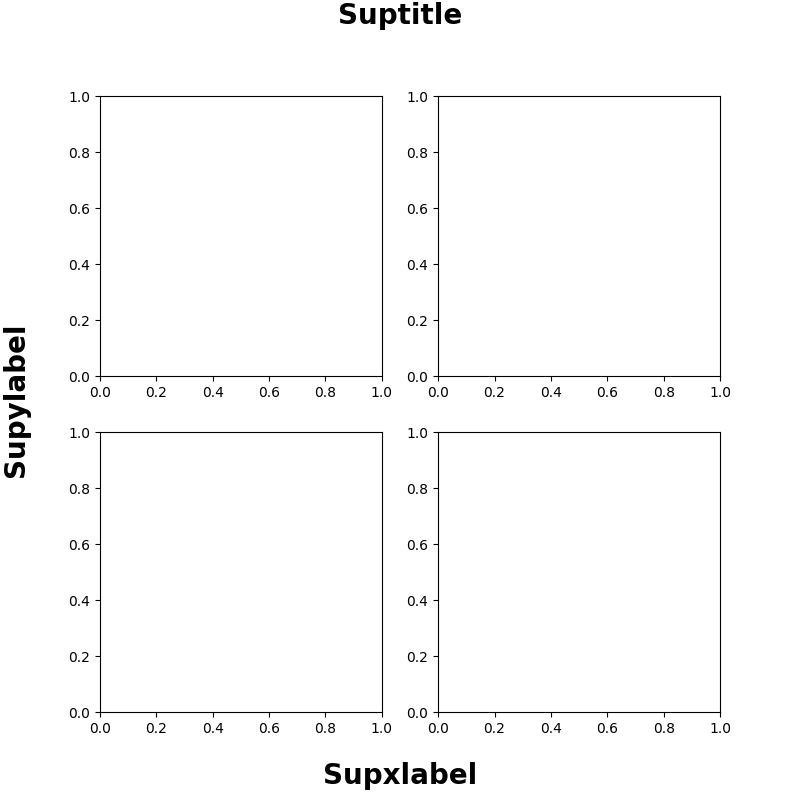
Figure标题(suptitle、supxlabel、supylabel)
fig = plt.figure(figsize=(8, 8), dpi=100)
ax = fig.subplots(2, 2)

fig.suptitle(t="Suptitle", x=0.5, y=0.98,     # 标题文本及锚定点在Figure中的坐标

             # Text参数
             ha="center",                     # 相对于锚定点水平对齐方式(horizontalalignment/ha): 可选'center'(默认), 'left', 'right'
             va="center",                     # 相对于锚定点垂直对齐方式(verticalalignment/va): 可选'top'(默认), 'center', 'bottom', 'baseline'
             fontsize=20,                     # 字体大小rcParams["figure.titlesize"]:默认'large'
             fontweight="bold"                # 字体粗细rcParams["figure.titleweight"]:默认'normal'
             )
fig.supxlabel(t="Supxlabel", x=0.5, y=0.03,   # x轴标题文本及锚定点在Figure中的坐标

              # Text参数
              ha="center",                    # 相对于锚定点水平对齐方式(horizontalalignment/ha): 可选'center'(默认), 'left', 'right'
              va="center",                    # 相对于锚定点垂直对齐方式(verticalalignment/va): 可选'top', 'center', 'bottom'(默认), 'baseline'
              fontsize=20,                    # 字体大小rcParams["figure.labelsize"]:默认'large'
              fontweight="bold"               # 字体粗细rcParams["figure.labelweight"]:默认'normal'
              )
fig.supylabel(t="Supylabel", x=0.02, y=0.5,   # y轴标题文本及锚定点在Figure中的坐标

              # Text参数
              ha="center",                    # 相对于锚定点水平对齐方式(horizontalalignment/ha): 可选'center', 'left'(默认), 'right'
              va="center",                    # 相对于锚定点垂直对齐方式(verticalalignment/va): 可选'top', 'center'(默认), 'bottom', 'baseline'
              fontsize=20,                    # 字体大小rcParams["figure.labelsize"]:默认'large'
              fontweight="bold"               # 字体粗细rcParams["figure.labelweight"]:默认'normal'
              )

plt.show()

img.png

Axes标题(set_title、set_xlabel、set_ylabel)

matplotlib.axes.Axes.set_title — Matplotlib 3.10.1 documentation

matplotlib.pyplot.title — Matplotlib 3.10.1 documentation

matplotlib.axes.Axes.set_xlabel — Matplotlib 3.10.1 documentation

matplotlib.pyplot.xlabel — Matplotlib 3.10.1 documentation

matplotlib.axes.Axes.set_ylabel — Matplotlib 3.10.1 documentation

matplotlib.pyplot.ylabel — Matplotlib 3.10.1 documentation
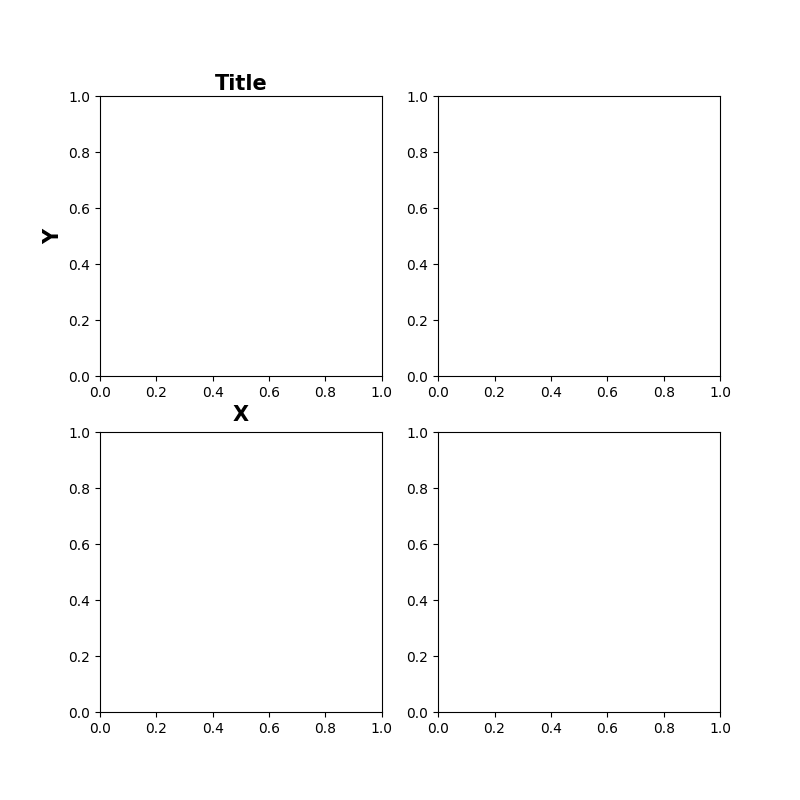
Axes标题(set_title、set_xlabel、set_ylabel)
fig = plt.figure(figsize=(8, 8), dpi=100)
ax = fig.subplots(2, 2)

ax[0, 0].set_title(label="Title",       # 标题文本
                   loc="center",        # 相对于Axes的水平位置(优先于设置Text的x和ha参数)rcParams["axes.titlelocation"]: 可选'center'(默认), 'left', 'right'
                   y=None,              # 标题的垂直Axes位置rcParams["axes.titley"]
                   pad=6,               # 相对于Axes顶部的垂直偏移点数 rcParams["axes.titlepad"]: 默认6

                   # Text参数
                   fontsize=15,
                   fontweight="bold"
                   )
ax[0, 0].set_xlabel(xlabel="X",         # x轴文本
                    loc="center",       # 相对于Axes的水平位置(优先于设置Text的x和ha参数)rcParams["xaxis.labellocation"]: 可选'center'(默认), 'left', 'right'
                    labelpad=4,         # 相对于x轴(包括刻度和刻度标签)的垂直偏移点数rcParams["axes.labelpad"]: 默认4

                    # Text参数
                    fontsize=15,
                    fontweight="bold"
                    )
ax[0, 0].set_ylabel(ylabel="Y",         # y轴文本
                    loc="center",       # 相对于Axes的垂直位置(优先于设置Text的y和ha参数)rcParams["yaxis.labellocation"]: 可选'center'(默认), 'bottom', 'top'
                    labelpad=4,         # 相对于y轴(包括刻度和刻度标签)的水平偏移点数rcParams["axes.labelpad"]: 默认4

                    # Text参数
                    fontsize=15,
                    fontweight="bold"
                    )

plt.show()

img.png

自动文本调整(adjustText)

Welcome to the documentation for adjustText! — adjustText documentation

Comments